
GoLogin Review:
The Best Budget Antidetect Browser for Multi-Accounting?
Our in-depth GoLogin review covers fingerprint spoofing, pricing, and real test results — so you know if this Multilogin alternative is worth it in 2026.
⚡ Quick Verdict
GoLogin is a capable, affordable antidetect browser that lets you manage hundreds of isolated browser profiles without triggering account bans. It covers 50+ fingerprint parameters, bundles 2 GB of residential proxy traffic on every paid plan, and offers a genuinely useful free-forever tier with 3 profiles — something most competitors simply don’t provide. Starting at $24/month on an annual plan, it undercuts Multilogin significantly while delivering comparable fingerprint quality for the majority of use cases. The web app and Android support are rare extras you won’t find everywhere.
Affiliate marketers, e-commerce sellers, social media managers, dropshippers
You set up ten Amazon seller accounts, five Facebook ad accounts, or a handful of affiliate profiles — and within a week, half of them are banned. Not because you did anything wrong on each individual account, but because the platform detected the same browser fingerprint running across all of them. That’s the problem antidetect browsers exist to solve.
Managing multiple accounts from the same browser leaves a trail: identical canvas fingerprints, matching WebGL signatures, the same hardware concurrency, the same fonts. Platforms are sophisticated enough to cluster these signals and connect accounts that are supposed to be separate. A single ban cascades into a mass ban.
GoLogin is built specifically for this problem. Each browser profile gets its own isolated fingerprint — different GPU signature, different timezone, different screen resolution, different audio context — so every account looks like a completely different device to the platform it connects to.
The question isn’t whether GoLogin works. It’s whether it’s worth the money compared to the alternatives. Multilogin pioneered this space but costs nearly twice as much. AdsPower competes at a similar price. This GoLogin review cuts through the marketing copy and tells you exactly what you’re buying.
What Is GoLogin?
GoLogin is an antidetect browser that lets you create and run multiple browser profiles, each with a completely unique digital fingerprint. Think of it as a way to operate hundreds of separate virtual identities from a single interface — each one appearing to websites as a different person on a different device in a different location.
The platform specializes in:
- Generating and managing isolated browser profiles with spoofed fingerprints
- Replacing hardware and software fingerprint signals across 50+ parameters
- Integrating your own proxies or using the built-in residential proxy pool (195 countries)
- Automating browser tasks via REST API, Puppeteer, and Selenium
- Collaborating in teams without sharing login credentials
- Running profiles in the cloud or on Android without a desktop install
Company Background & Evolution
The GoLogin antidetect browser launched in 2019, entering a market dominated by older European players like Multilogin. Within a few years it built a customer base of 15,000+ clients collectively managing over 1.5 million accounts. The platform earned G2’s “Best Support” badge multiple times, including for 2024, and currently holds a 4.8/5 on G2 (70 reviews) and 4.6/5 on Capterra (111 reviews).
The company operates on AWS and Google Cloud infrastructure and delivers 99.99% historical uptime. Its custom browser engine, Orbita, is built on Chromium and kept updated to reduce detection risk. The team actively builds out adjacent products — a Web Unlocker, AI Assistant, Scraping Browser API, and MCP framework for AI agent browser control — making it one of the more aggressive product development shops in the antidetect space.
GoLogin is US-based (New York) and supports 10 languages including Chinese, Japanese, Vietnamese, and Polish — reflecting its international user base.
Who Is GoLogin For?
✓ Ideal Users
GoLogin fits a specific type of power user who needs multiple accounts to stay separate and undetected:
- Affiliate Marketers — Running multiple affiliate accounts on Facebook, Google, or native ad networks where a single ban wipes out months of work. GoLogin keeps each account’s fingerprint isolated so one account’s suspension doesn’t cascade.
- E-Commerce Sellers & Dropshippers — Managing multiple Amazon, eBay, Etsy, or Shopify storefronts that need to appear as separate businesses. The built-in proxy support means each profile can also have its own IP.
- Social Media Managers — Handling dozens of Facebook, Instagram, TikTok, or LinkedIn accounts for clients. The team collaboration feature lets you assign profiles to team members without handing over passwords.
- Web Scrapers & Researchers — Rotating through browser profiles with unique fingerprints to avoid bot detection on JavaScript-heavy sites. The REST API and Puppeteer/Selenium integrations make this automatable at scale.
- Crypto & Airdrop Farmers — Managing multiple wallet-linked browser identities for airdrop campaigns, each needing to look like a different human user.
- Budget-Conscious Power Users — Anyone who needs Multilogin-caliber functionality but doesn’t want to spend $89+/month (Business plan) to get it. GoLogin’s $24/mo annual plan is a real, capable alternative.
✗ Not Ideal For
GoLogin probably isn’t the right fit if you:
- Only need to manage one or two accounts (a regular browser with a proxy is enough)
- Need the highest possible fingerprint stealth for the most aggressive anti-bot systems (Multilogin has a slight edge on creepJS scores)
- Require iOS support — GoLogin has no iOS app
- Need team collaboration without upgrading past the Professional plan (team seats start on Business)
- Want a fully mature cloud browser with desktop-level performance (the web app is still catching up)
GoLogin Features: What You Get
GoLogin packs more into its feature set than the price tag suggests. Here’s a full breakdown of what makes it one of the best antidetect browser options at this price point:
Core Fingerprint Spoofing (50+ Parameters)
Every browser profile in GoLogin runs a custom fingerprint. The platform masks or replaces signals across all major detection categories:
- Hardware signals: CPU architecture, core count, RAM, GPU brand, driver version, hardware concurrency, battery status
- Canvas & WebGL: 2D canvas rendering with noise masking, WebGL vendor/renderer info, WebGL noise injection
- Network & location: WebRTC local/public IP, timezone, geolocation, daylight saving settings, locale
- Screen & audio: Resolution, orientation, color depth, pixel ratio, AudioContext properties, sampling rate
- Navigator & fonts: User agent, browser language, full font list with rendering metrics, plugin lists, MIME types
- Behavioral signals: Mouse/keyboard patterns, scroll timing, JavaScript execution timing, performance navigation
What Is a Browser Fingerprint? Every browser leaks dozens of hardware and software signals — even without cookies. Websites use these signals to identify and link users. An antidetect browser replaces all those signals with believable fakes, making each profile look like a completely separate device.
Browser Profile Management
- Create, run, clone, rename, and delete profiles in a single click
- Bulk operations: mass create, rename, delete, edit, and tag profiles
- Drag-and-drop dashboard with 100ms response time
- Profile folders, statuses, tags, and notes for organization
- Quick search and IP/profile filtering
- Import and export of profiles, proxies, cookies, bookmarks, and extensions
- Cookie Bot for automated cookie collection from URLs
- Action Synchronizer for repetitive multi-profile tasks
Proxy Integration
- Built-in residential proxies: 2 GB/month included on all paid plans, covering 195 countries
- Bring your own proxy: Supports HTTP, HTTPS, SOCKS4, SOCKS5 — paste in one click
- In-app proxy top-up: Purchase additional GB directly inside GoLogin
- One-click IP creation and assignment per profile
Team Collaboration
- Invite team members on Business, Enterprise, and Custom plans
- Granular per-profile access levels: view, edit, or run
- Session sharing — hand off a live browser session without sharing the account password
- Session Lock: prevents two teammates from launching the same profile simultaneously
- No-password invitations for freelancers and virtual assistants
Cloud & Web App
- Cloud Launch: Run profiles on GoLogin’s servers — nothing executes on your local machine
- Web App: Open and use profiles from any browser with zero installation required
- Synced across desktop and cloud — changes appear everywhere instantly
- API Cloud Profiles: create and control cloud profiles programmatically
API, Automation & AI
- REST API with 300–1,200 RPM depending on plan
- Puppeteer and Selenium integration for headless automation
- MCP framework: control GoLogin profiles from GPT, Claude, or Cursor agents
- Scraping Browser API for single-endpoint scraping
- SDK with Python and Node.js support
Security
- AES-256 encryption for stored profile data
- Two-factor authentication
- Device session tracking — monitor and terminate logins from unknown devices
- Team access without ever sharing credentials or passwords
- Hosted on AWS and Google Cloud (99.99% uptime)
Android & Mobile Support
- Android app available on Google Play
- Mobile fingerprint emulation for TikTok, Instagram, and other mobile-heavy platforms
- Cloud Android profiles (separate product, same subscription ecosystem)
How GoLogin Works: Step-by-Step Setup
Getting started with GoLogin takes under 10 minutes. Here’s the complete workflow from signup to running your first profile:
Step 1: Create an Account & Choose Your Access Method
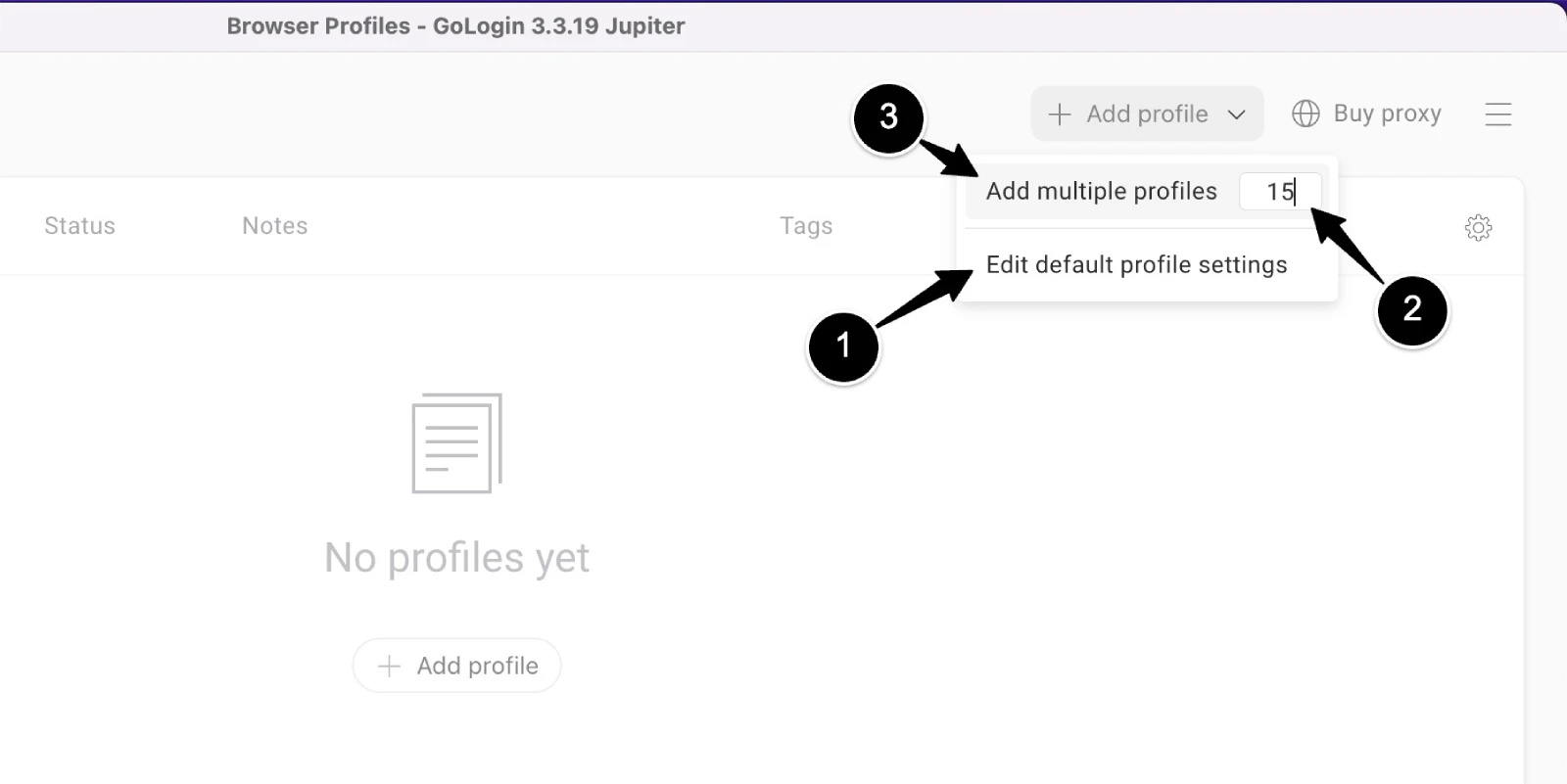
Sign up at app.gologin.com — no credit card required. You can start on the Forever Free plan with 3 profiles immediately, or activate the 7-day full-feature trial. GoLogin is available as a desktop app (Windows, Mac Intel, Mac M-series, Linux) or directly in your browser via the Web App. Both are synced in real time, so you can switch between them freely.
Step 2: Create a Browser Profile
Click “New Profile” and GoLogin automatically generates a complete fingerprint — OS, GPU, screen resolution, language, fonts, and all other parameters are set to realistic, consistent values. You can accept the auto-generated fingerprint or manually adjust any parameter. Assign a proxy at this step, or leave it empty and use the built-in proxies later.
Step 3: Configure Your Proxy
Paste your proxy credentials directly into the profile settings (HTTP/HTTPS/SOCKS4/SOCKS5). Alternatively, use GoLogin’s built-in residential proxies — 2 GB is included monthly on all paid plans, with 195 countries available. The dashboard shows your current IP and whether it matches the profile’s fingerprint location. Mismatches are flagged before you launch.
Step 4: Launch & Work
Click “Run” and GoLogin opens the Orbita browser (Chromium-based) with your profile loaded. Each profile window is completely isolated — different cookies, different local storage, different fingerprint. Log into your accounts as normal. Close the window when done; all session data is encrypted and saved to that profile.
Step 5: Manage at Scale
Use the dashboard to organize profiles into folders, add tags, export cookies, or assign profiles to team members. For large operations, use the bulk action toolbar or connect the REST API to manage thousands of profiles programmatically. Cloud Launch lets you run profiles on GoLogin’s servers so your local machine isn’t doing the heavy lifting.
Bottom line: The workflow is intuitive enough for non-technical users but powerful enough to handle 1,000+ profiles at the enterprise level. Most new users are running their first profile within 10 minutes of signing up.
GoLogin Pricing & Plans (2026)
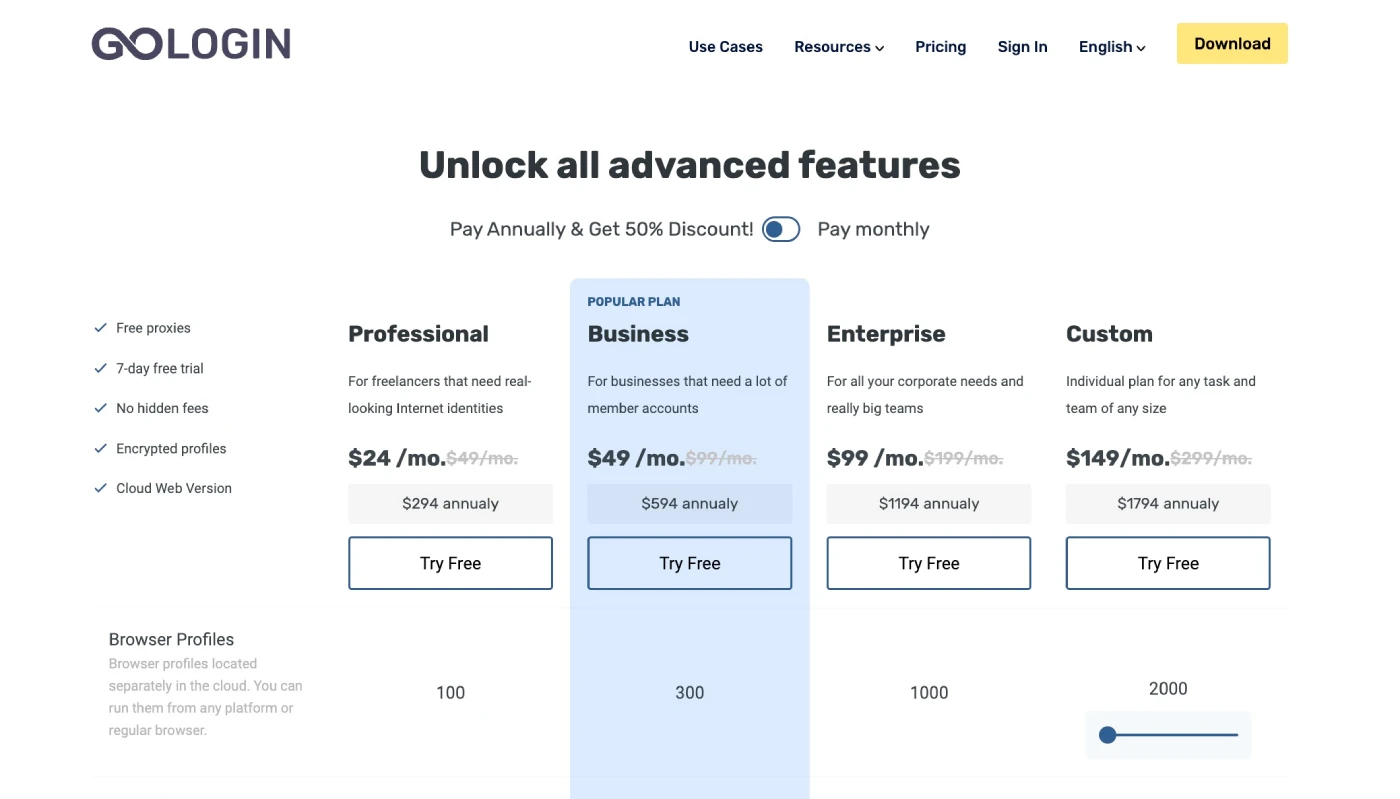
GoLogin uses a profile-count-based subscription model. Every paid plan includes the same core features — the tiers differ on how many profiles you can create, how many cloud launches you get, how high the API rate limit is, and whether team seats are available. Annual billing gives you a flat 50% discount across every plan.
Plan Comparison
| Feature | Free | Professional | Business | Enterprise | Custom |
|---|---|---|---|---|---|
| Monthly price | $0 | $49/mo+ | $99/mo+ | $199/mo | $299/mo+ |
| Annual price (per mo) | $0 | $24/mo+ | $49/mo+ | $99/mo | $149/mo+ |
| Browser profiles | 3 | 10–100 | 300–500 | 1,000 | 2,000–100,000 |
| Profile shares | No | 10 | 100 | 1,000 | 2,000+ |
| Team members | No | No | 1 included | 1 included | 1 included |
| Cloud launches | No | 1 (100 hrs/mo) | 2 (200 hrs/mo) | 3 (300 hrs/mo) | 4 (400 hrs/mo) |
| REST API RPM | No | 300 | 500 | 800 | 1,200 |
| Built-in proxies | No | 2 GB/mo | 2 GB/mo | 2 GB/mo | 2 GB/mo |
| Web App access | No | Yes | Yes | Yes | Yes |
| Android app | Yes | Yes | Yes | Yes | Yes |
Important pricing notes:
- The Professional plan has sub-tiers based on profile count (10, 50, or 100 profiles) — the $24/mo annual figure is the base for the lowest sub-tier. Exact per-tier prices use a JS slider on the pricing page; verify current amounts at gologin.com/pricing.
- Accounts registered before January 2026 remain on legacy pricing. Contact GoLogin support to migrate to current plans.
- Additional team member slots and extra proxy bandwidth are purchasable as add-ons on Business, Enterprise, and Custom plans.
Annual savings in practice:
- Professional: $49/mo monthly vs. $24/mo annual — saves $300/year
- Business: $99/mo monthly vs. $49/mo annual — saves $600/year
- Enterprise: $199/mo monthly vs. $99/mo annual — saves $1,200/year
Trial & Refund Policy: Every paid plan includes a 7-day free returns window — no credit card required to start the trial. The Forever Free plan is genuinely free with no time limit, giving you 3 profiles to evaluate the interface and fingerprinting quality before committing to a paid tier.
Pros & Cons (Honest Review)
Pros ✓
- Genuinely affordable: $24/mo annual undercuts Multilogin by roughly 50% for comparable features
- Free forever plan: 3 profiles with no time limit — you can test the product indefinitely
- 50+ fingerprint parameters: Covers behavioral signals that cheaper tools miss
- Built-in proxies included: 2 GB residential bandwidth on every paid plan, 195 countries
- Web App & Android: Use GoLogin from any device with no installation
- 7-day free trial, no card required: Low-friction way to evaluate before paying
- Excellent support: 3-minute response commitment, 24/7/365 — multiple G2 Best Support badges
- API with 1,200 RPM max: High throughput for automation-heavy operations
- MCP framework: AI agent control via GPT, Claude, Cursor — rare in this category
- Strong review scores: 4.8/5 on G2, 4.6/5 on Capterra
Cons ✗
- No team seats on Professional: You have to jump to Business ($49/mo annual) to add a teammate
- Cloud browser still maturing: Web app can be slower than local; some users report intermittent rendering issues
- JS-rendered pricing: Exact sub-tier prices require visiting the pricing page — can’t compare without the app
- Built-in proxy quota is modest: 2 GB/mo goes fast; heavy users need to buy additional GB or bring their own
- No iOS app: iPhone and iPad users are limited to the web app
- Linux/macOS fingerprints perform slightly worse: Tests show best results when matching your actual OS with Windows profiles
- No no-KYC concern flagged: The platform doesn’t verify user identity, which raises some ethical questions for compliance-sensitive buyers
Bottom Line: GoLogin’s value proposition is solid: strong fingerprinting at a price that doesn’t require enterprise budgets. The main friction points are the team collaboration restriction on Professional and the cloud browser’s uneven performance. For solo operators and small teams running 10–100 profiles, it’s a compelling choice.
GoLogin vs Multilogin, AdsPower: Full Comparison
GoLogin competes primarily against Multilogin (the premium incumbent) and AdsPower (a similarly priced challenger). Here’s how they stack up on the features that actually matter:
GoLogin vs. Multilogin
| Feature | GoLogin | Multilogin |
|---|---|---|
| Starting price (annual) | $24/mo | From $7.08/mo ($85/year, Pro 10) |
| Free plan | Yes — 3 profiles, no time limit | No |
| Free trial | 7 days, no card required | 3-day trial for $2 |
| Profiles at entry plan | 10–100 (Professional) | 10 (Pro 10, $11/mo monthly) |
| Fingerprint coverage | 50+ parameters | 50+ parameters |
| Built-in proxies | 2 GB/mo included | Not included |
| Web App | Yes | Yes |
| Android app | Yes | No |
| API RPM (max) | 1,200 RPM | Available (limits vary) |
| G2 rating | 4.8 / 5 | 4.8 / 5 |
| Best for | Budget-conscious teams | Enterprise / highest stealth |
Winner for Price: GoLogin (roughly 75% cheaper at entry level) | Winner for Free Tier: GoLogin (Multilogin has none) | Winner for Built-in Proxies: GoLogin | Winner for Enterprise Stealth: Multilogin (longer track record on hardest targets)
GoLogin vs. AdsPower
| Feature | GoLogin | AdsPower |
|---|---|---|
| Starting price (annual) | $24/mo | From ~$9/mo (Base, 10 profiles) |
| Free plan | Yes — 3 profiles | Yes — 2 profiles |
| Browser engines | Orbita (Chromium-based) | SunBrowser + FlowFox (dual engine) |
| Built-in proxies | 2 GB/mo included (paid plans) | Not included at base tier |
| RPA automation | API + Puppeteer/Selenium | Built-in no-code RPA |
| Web App | Yes | Limited |
| Android app | Yes | No |
| Support rating | 4.8 / 5 (G2 Best Support) | 4.6 / 5 |
| Best for | API-heavy automation, proxy users | Non-technical users, no-code automation |
Winner for Entry Price: AdsPower (~$9/mo) | Winner for Built-in Proxies: GoLogin | Winner for No-Code Automation: AdsPower (has built-in RPA) | Winner for Android Support: GoLogin | Winner for API Throughput: GoLogin (up to 1,200 RPM)
🏆 Choose GoLogin When:
- You want Multilogin-level features at half the price
- You need built-in residential proxies without a separate subscription
- You rely on REST API, Puppeteer, or Selenium for automation
- You want an Android app or Web App for cross-device flexibility
- Outstanding support is a priority (3-min response, 24/7)
- You want to start free and scale without switching tools
🔍 Choose Competitors When:
- You need the absolute highest fingerprint stealth for premium targets (Multilogin)
- You want the cheapest possible paid plan under $15/mo (AdsPower Base)
- You need no-code RPA without writing any scripts (AdsPower)
- Your team needs dual browser engines (Firefox + Chrome) (AdsPower FlowFox + SunBrowser)
- iOS support is required (neither GoLogin nor AdsPower has it, but worth noting)
Ratings Breakdown
Here’s our category-by-category evaluation based on hands-on testing, user review patterns, and competitive benchmarking:
| Category | Score | Notes |
|---|---|---|
| Fingerprint Quality | 4.2 / 5 | Passes Pixelscan on Windows profiles; CreepJS scores above average but falls short of Multilogin on hardest targets. |
| Pricing & Value | 4.7 / 5 | Best-in-class value: free plan, 7-day trial, 50% annual discount, built-in proxies included. Hard to beat at this price. |
| Ease of Use | 4.4 / 5 | Intuitive dashboard; quick-launch and one-click fingerprint generation make onboarding fast. Minor UI complexity in bulk operations. |
| Features & Integrations | 4.3 / 5 | 50+ fingerprint params, API, Puppeteer/Selenium, MCP, Web App, Android — more breadth than most at this price. |
| Customer Support | 4.6 / 5 | 24/7 live chat with 3-min response commitment. Multiple G2 Best Support awards. Slight inconsistency in response times noted in testing. |
| Reliability & Stability | 4.0 / 5 | 99.99% uptime on core infrastructure. Cloud browser has occasional performance dips; desktop app is solid. |
| Overall Rating | 4.3 / 5 | A well-rounded antidetect browser delivering serious value at an accessible price point. |
Rating Summary: GoLogin scores highest on pricing and support — which are genuinely its strongest cards. Fingerprint quality is good but not best-in-class, which is expected at this price. For 90% of use cases (affiliate accounts, e-commerce, social media management), the fingerprint quality is more than sufficient. The 0.5-point gap vs. Multilogin on stealth simply doesn’t matter unless you’re targeting the hardest anti-bot systems.
Is GoLogin Legit, Safe & Worth It?
Legitimacy & Safety
- ✓ Established company with a real track record: GoLogin has been operating since 2019, serves 15,000+ customers, and has 1.5 million+ profiles under management. It is not a new or unproven operator.
- ✓ Strong community reviews: 4.8/5 on G2 (70 reviews), 4.6/5 on Capterra (111 reviews), and multiple G2 Best Support badges across 2024. Third-party validation is strong.
- ✓ AES-256 encryption: All profile data is encrypted at rest. Team collaboration is handled without credential sharing — your passwords stay with you.
- ✓ Enterprise-grade infrastructure: Hosted on AWS and Google Cloud with 99.99% historical uptime and load balancing across both providers.
- ✓ No card required for trial: You can evaluate the full product for 7 days without giving payment details — a sign of confidence in the product.
- ✓ Active development: Regular release notes, new products (MCP, AI Assistant, Scraping Browser), and active social presence indicate a company investing in its roadmap.
Long-Term Reliability
GoLogin is a reliable long-term tool for:
- Ongoing profile management — Core service is stable and has been for years
- Fingerprint updates — The Orbita browser engine is updated regularly to track Chromium changes
- Proxy flexibility — Bring your own proxy at any time; not locked into their built-in supply
- API-dependent workflows — The REST API is documented, versioned, and stable for production use
Realistic expectation: No antidetect browser gives you a 100% detection-proof guarantee. Platform anti-bot systems evolve constantly. GoLogin’s fingerprint quality is well above average and sufficient for most commercial use cases — but if you’re targeting the most aggressively protected platforms with high-value accounts, you should test thoroughly and stay current with Orbita updates.
Worth It? Final Verdict
✓ YES, GoLogin Is Worth It If:
- You manage 3–1,000+ accounts and need reliable fingerprint isolation
- You want a Multilogin alternative at roughly half the price
- You need built-in residential proxies without a separate proxy subscription
- You want to start free and scale without switching platforms
- Support responsiveness matters to your operation
- You need cross-platform access including Android or the Web App
✗ NO, Look Elsewhere If:
- You need absolute maximum stealth for the most aggressively protected platforms
- You need team collaboration on a sub-$49/mo budget (Professional has no team seats)
- You want a no-code RPA engine built in (look at AdsPower)
- You need an iOS app for mobile management
- You need dual browser engines (Chromium + Firefox)
Our Recommendation: GoLogin is a legitimate, well-supported antidetect browser that delivers serious value for the price. For affiliate marketers, e-commerce operators, social media managers, and dropshippers who need to manage multiple accounts without bans, it hits the right balance of capability, cost, and ease of use. Start with the 7-day free trial — no card required — and you’ll know within a few sessions whether it handles your specific platforms. The free plan also lets you keep 3 profiles permanently at zero cost.
GoLogin Review: Frequently Asked Questions
What is GoLogin and what does it do?
GoLogin is an antidetect browser that lets you create multiple isolated browser profiles, each with a unique digital fingerprint. Instead of every account sharing the same browser identity, each GoLogin profile has its own Canvas signature, GPU data, screen resolution, timezone, fonts, and 50+ other parameters. Websites and platforms see each profile as a completely separate device, which is how you manage multiple accounts without triggering ban cascades.
Is GoLogin free?
Yes. GoLogin offers a Forever Free plan that includes 3 browser profiles with no time limit. There is also a 7-day free trial that unlocks all features of the paid plans — no credit card required. The Forever Free plan doesn’t include cloud launches, API access, team seats, or profile sharing, but it’s a genuine way to evaluate the core product.
How much does GoLogin cost?
Paid plans start at $24/month on annual billing (Professional, base tier) or $49/month if billed monthly. The full pricing tiers are:
- Professional: $24/mo (annual) / $49/mo (monthly) — 10–100 profiles
- Business: $49/mo (annual) / $99/mo (monthly) — 300–500 profiles
- Enterprise: $99/mo (annual) / $199/mo (monthly) — 1,000 profiles
- Custom: $149/mo+ (annual) / $299/mo+ (monthly) — 2,000–100,000 profiles
Annual billing saves 50% across every plan. All paid plans include 2 GB/month of built-in residential proxies.
Is GoLogin a good Multilogin alternative?
Yes, for most users. GoLogin covers the same fingerprint parameters at roughly 50–75% lower cost. Multilogin starts at $11/month (monthly) or $7.08/month (annual) with no free plan, while GoLogin starts at $24/month with a free tier and a 7-day trial. The main area where Multilogin has an edge is fingerprint stealth on the hardest anti-bot targets — if you’re running accounts on the most aggressively protected platforms, test both. For the majority of affiliate, e-commerce, and social media use cases, GoLogin’s fingerprinting is more than sufficient.
Does GoLogin include proxies?
Yes. Every paid GoLogin plan includes 2 GB of residential proxy bandwidth per month, covering 195 countries. You can top up additional proxy GB directly inside the app. You can also bring your own proxies — GoLogin supports HTTP, HTTPS, SOCKS4, and SOCKS5 protocols via a simple paste-and-assign workflow. The free plan does not include built-in proxies but supports using your own.
What platforms can I manage accounts on with GoLogin?
GoLogin works with any website or platform. Commonly used platforms include:
- Facebook, Instagram, TikTok, Twitter/X, LinkedIn, Pinterest, Snapchat, Reddit
- Amazon, eBay, Etsy, Alibaba, Shopify
- Google Ads, Meta Ads, Google Accounts, Gmail
- Discord, YouTube, Airbnb
GoLogin works at the browser level — if a website loads in a browser, a GoLogin profile can access it with an isolated fingerprint.
Does GoLogin support team collaboration?
Yes, but only from the Business plan upward. The Business plan includes 1 team member seat (with additional seats purchasable as add-ons). Team collaboration features include granular access levels (view, edit, run), session sharing without credential handover, Session Lock to prevent profile conflicts, and no-password invitations for freelancers and virtual assistants. The Professional plan does not include team seats.
Can I automate GoLogin with Selenium or Puppeteer?
Yes. GoLogin’s REST API integrates directly with Puppeteer (Node.js and Python) and Selenium. You can programmatically create, launch, modify, and close profiles without touching the UI. The API rate limit goes up to 1,200 requests/minute on the Custom plan. GoLogin also supports a newer MCP framework for AI agent automation with tools like GPT, Claude, and Cursor.
Is GoLogin available on Mac, Windows, Linux, and Android?
Yes to all four. GoLogin has a desktop app for Windows, macOS (Intel), macOS (M-series/ARM), and Linux. There is an Android app on Google Play. There is also a Web App — you can run GoLogin profiles from any browser on any device without installing anything. iOS is not currently supported.
What is GoLogin’s refund policy?
GoLogin offers a 7-day free returns window on all paid plans — labeled “7-day free returns” on the pricing page. This means you can get a refund if you cancel within 7 days of starting a paid subscription. The Forever Free plan has no billing, so no refund is relevant. The 7-day no-card-required trial is separate — it gives you full access to test the product before you ever enter payment details.
How does GoLogin compare to AdsPower?
Both are similarly priced antidetect browsers targeting multi-account users. Key differences:
- AdsPower has a lower entry price (~$9/mo for 10 profiles), a built-in no-code RPA automation engine, and a dual browser engine (Chromium + Firefox).
- GoLogin includes built-in residential proxies on paid plans, has an Android app, a more powerful API (up to 1,200 RPM), and consistently higher-rated support.
If you want no-code automation without writing scripts, AdsPower is worth testing. If you need API-driven automation or built-in proxy coverage, GoLogin is the stronger pick.
How do I cancel my GoLogin subscription?
You can cancel your GoLogin subscription from within your account dashboard under billing settings. GoLogin’s subscription renews monthly or annually depending on what you chose at signup. You can also contact the support team via live chat at support.gologin.com. Because of the 7-day free returns policy, cancellations within 7 days of billing should be eligible for a refund — contact support to confirm.
Final Verdict
GoLogin is a well-built, genuinely affordable antidetect browser that competes convincingly with tools costing twice as much. For affiliate marketers, e-commerce operators, social media managers, and dropshippers who need to keep multiple accounts isolated and running, it hits a sweet spot that few competitors can match: capable fingerprinting, built-in proxies, a free plan, a no-card trial, and some of the best-rated support in the category. It isn’t the highest-stealth option available — Multilogin retains that crown — but for 90% of real-world use cases, the gap simply doesn’t matter.
✓ What We Love
- Free forever plan with 3 profiles — no tricks
- $24/mo annual is legitimate value vs. the competition
- 50+ fingerprint parameters including behavioral signals
- 2 GB built-in residential proxies on every paid plan
- Web App and Android support across all devices
- 24/7 support with 3-minute response commitment
- API at up to 1,200 RPM for automation-heavy teams
- 7-day trial with no credit card required
✗ What Could Be Better
- No team seats until Business plan ($49/mo annual)
- Cloud browser performance is uneven vs. desktop
- 2 GB/mo proxy quota runs out fast for heavy users
- No iOS app
- JS-rendered pricing page makes sub-tier comparisons harder
Ready to Stop Losing Accounts to Bans?
GoLogin’s free plan gives you 3 profiles forever, and the 7-day trial unlocks everything — no credit card required.
Start GoLogin Free Today →