
8 Best Footsite Proxy Providers in 2026
The best footsite proxies of 2026, ranked by DataDome bypass rate, sticky session length, ISP quality, and price — for Foot Locker, Champs, and Nike SNKRS.
⚡ Quick Verdict
Footsites are not easy targets for bots. Foot Locker, Champs Sports, Eastbay, and Footaction all run DataDome — one of the most aggressive bot-detection systems in e-commerce. Datacenter proxies get blocked within seconds. Generic residential pools with short sticky sessions drop you out of the queue mid-wait. You need ISP proxies or high-quality rotating residential proxies with sessions that hold for at least 10–30 minutes. After evaluating eight providers on proxy type quality, sticky session support, DataDome bypass rates, and pricing, Decodo leads on value and speed, Bright Data leads on raw infrastructure, and Oxylabs is the premium pick for serious resellers who need 30-minute sessions and a dedicated account manager. Your pick depends on budget, volume, and whether you need ISP or residential proxies.
Decodo — 99.86% success rate, 30-min sticky sessions, from $3/GB
Bright Data — 400M+ IPs, 1.3M+ ISP IPs, full DataDome handling
Oxylabs — 175M+ pool, ISP proxies in 14 countries, 30-min sessions
IPRoyal — from $1.75/GB PAYG, non-expiring traffic, sneaker proxy pools
The release drops in three minutes. You have your sneaker bot loaded, six tasks configured, and a set of footsite proxies you paid good money for. Then the queue fires. Every task fails. Banned. Your proxies were datacenter IPs — and Foot Locker’s DataDome system wiped them out before you even reached the cart.
That’s the reality of Footsite copping in 2026. The Foot Locker family of stores — Foot Locker, Champs Sports, Eastbay, and Footaction — all share the same back-end infrastructure, which means they share the same anti-bot protection. Get banned on one, and you’re likely banned across all of them. Choosing the wrong footsite proxy type isn’t just inefficient; it’s a complete waste of the drop.
Footsites have moved to a queue system, which changes what you need from a sneaker proxy. Speed matters less than it did in the first-come-first-served era. What matters now is holding a consistent IP long enough to survive the queue — at least 10 minutes, ideally 30. That rules out most rotating residential proxies with short sessions, and it absolutely rules out datacenter proxies. ISP proxies for sneakers (static residential IPs issued by real ISPs) have become the go-to for serious sneakerheads. Good residential proxies with configurable sticky sessions are the budget alternative.
This guide covers eight providers tested specifically for Footsite compatibility — DataDome bypass, sticky session support, US and UK IP quality, and pricing. All data comes from provider knowledge files and independent Proxyway benchmarks (April 2025).
What Are Footsite Proxies?

Footsite proxies are IP addresses specifically chosen to work on the Foot Locker family of stores: Foot Locker, Champs Sports, Eastbay, and Footaction. All four share the same server infrastructure and the same DataDome bot-detection system. A proxy that works on one will work across all of them — and a proxy that gets banned on one will be banned across all of them too.
Three proxy types are used for Footsite copping, with very different success rates:
- ISP Proxies (Static Residential) — IPs leased directly from real ISPs and hosted on server hardware. They carry genuine residential ASN data, so DataDome sees them as real home users. They’re static — same IP for the entire session — which is ideal for Footsite queues that can run 10–30 minutes. This is the highest-trust option and the preferred choice for serious resellers running multiple tasks simultaneously.
- Residential Proxies (Rotating) — IPs from real home devices, shared through opt-in peer networks. They look genuine to DataDome but rotate on a schedule or per request. For Footsites, you need to configure sticky sessions so the same IP holds for at least 10–30 minutes while you wait in queue. Without sticky sessions, you’ll fall out of the queue when the IP rotates.
- Datacenter Proxies — Fast and cheap, but hosted in data center IP ranges that DataDome recognizes and blocks almost immediately. Occasionally useful for CAPTCHA harvesting tasks (where you need cheap Google-accessible IPs), not for actual checkout tasks on Footsites.
Why Footsites Share a Shared Ban System
Foot Locker, Champs Sports, Eastbay, and Footaction operate on shared backend servers and databases. They use the same payment processor (Adyen) and the same anti-bot layer (DataDome). This integration means an IP ban on one site propagates across the entire network. It also means that if you use the same billing profile on multiple tasks, Adyen’s fraud detection fires and issues cancellation emails across all of them — so you need separate billing profiles per task alongside your proxy setup.
Who Needs Footsite Proxies?
✓ Ideal Users for Footsite Proxies
- Sneaker Resellers — Running multiple bot tasks to cop limited-edition Jordans, Yeezys, or Nike SNKRS releases at retail. Each task needs its own unique IP — proxies are the only way to run more than one task without getting everything flagged from the same address.
- Bot Users (Nike Shoe Bot, Kodai, Wrath, etc.) — All major sneaker bots require proxies to create multiple tasks. Your bot’s proxy configuration will specify protocol (HTTP/SOCKS5), sticky session duration, and rotation settings — picking the right provider means those settings actually work on DataDome-protected Footsites.
- Multi-Account Managers — Managing several Foot Locker or Nike accounts to improve your chances across a release. Each account needs its own residential or ISP Foot Locker proxy IP to avoid geo-mismatch flags and prevent cross-account linkage.
- International Buyers — Some Footsite drops are US-only or UK-only. US residential or ISP proxies let you access US-exclusive releases; UK proxies unlock Foot Locker UK and JD Sports drops that never make it to other regions.
- CAPTCHA Harvesters — Footsites use CAPTCHAs that require a separate harvesting setup. This specific task only needs cheap datacenter IPs that can access Google’s CAPTCHA service — not the premium proxies you’d use for actual checkout tasks.
✗ Not Ideal For
Footsite proxies are NOT the right tool if you:
- Want to run a single task manually — your home IP works fine for one account on one task
- Are looking to scrape product data or inventory at scale — a datacenter or residential scraping proxy is more cost-effective for that use case
- Expect 100% success rates — even the best proxies can’t guarantee a cop on a high-demand release; many moving parts (bot configuration, billing profiles, luck) determine the final outcome
- Need proxies for non-Footsite sneaker sites — Nike SNKRS, Adidas, and Supreme have different anti-bot systems and may require different proxy configurations
8 Best Footsite Proxy Providers — Tested & Ranked
The eight providers below were evaluated on four criteria that directly affect Footsite performance: proxy type quality (ISP vs residential), sticky session availability and duration, DataDome bypass track record, and price. Each section includes real pricing from knowledge files and independent benchmark scores from Proxyway (April 2025).
1. Decodo (formerly Smartproxy)

Decodo (rebranded from Smartproxy in April 2025) is the top overall pick for Footsite proxies. Proxyway named it the fastest residential proxy network globally in its April 2025 benchmark — and it has won the Best Value Provider award for five consecutive years. For sneaker copping, speed matters less than session stability, but Decodo delivers both: 30-minute sticky sessions on residential, dedicated ISP proxies with static IPs you keep indefinitely, and a clean proxy dashboard that integrates with all major sneaker bots.
Why It Works for Footsites: Decodo’s residential proxies support sticky sessions up to 30 minutes — long enough to survive even the slowest Footsite queue. Its ISP proxies offer fully static dedicated IPs from premium US and European ASNs (AT&T, Comcast, Verizon equivalents) that pass DataDome’s residential verification. The 30-minute preset is available in the dashboard with one click — no custom scripting needed.
Pricing: Residential from $3.75/GB (3 GB plan) or $4/GB PAYG. ISP Dedicated from $2.10/IP/month (1,000 IP tier). ISP Pay/GB from $1.30/GB. Free 3-day / 100 MB trial available.
Pros ✓
- 30-minute sticky sessions — essential for Footsite queues
- Dedicated ISP proxies with static IPs from premium ASNs
- 99.86% residential success rate (Proxyway April 2025)
- Fastest residential proxies globally (Proxyway benchmark)
- No concurrency limits — run unlimited bot tasks simultaneously
- Best Value award 5 consecutive years (Proxyway)
- Free 3-day / 100 MB trial to test before committing
Cons ✗
- ISP proxies only available in select locations (US, UK, DE, FR, and others — not all countries)
- PAYG and monthly subscription cannot be used simultaneously
- Crypto payments not accepted for ISP per-IP plans
Proxyway Rating: 9.3/10 (4.7/5 stars) — Best Value Provider 5 consecutive years (2020–2025).
2. Bright Data

Bright Data is the infrastructure benchmark. At 400M+ residential IPs and 1,300,000+ ISP (static residential) IPs across 50+ countries, it’s the largest proxy network in the industry. For Footsites specifically, the ISP pool is the relevant differentiator — 1.3M+ static residential IPs on real ISP ASNs that DataDome has no legitimate reason to flag. If you’re running a large sneaker operation with dozens of tasks and cannot afford to lose sessions mid-drop, Bright Data’s reliability and pool depth justify the premium price. New users can get 60% off with code PROXYWAY60.
Why It Works for Footsites: Bright Data’s residential proxies achieved a 98.96% global success rate in Proxyway testing. Its ISP proxies are drawn from 50+ countries and support customizable sticky sessions. The Proxy Manager tool lets you configure rotation behavior, session duration, and per-domain rules from a single dashboard — useful when managing Footsite tasks alongside other sites.
Pricing: Residential PAYG at $8/GB (new users: $4/GB with code PROXYWAY60 — 60% off). ISP from $1.30/IP/month (shared). Subscription plans from $499/mo. 7-day free trial for companies.
Pros ✓
- 400M+ residential IPs — largest pool globally
- 1.3M+ ISP proxies across 50+ countries
- 98.96% residential success rate (Proxyway tested)
- Full Proxy Manager for advanced session and rotation control
- ISO 27001 certified — enterprise-grade compliance
- PROXYWAY60 gives 60% off for new users
Cons ✗
- Premium pricing — $8/GB PAYG before discount
- KYC required (up to 3 business days; freelancers need video call)
- Subscription starts at $499/mo — too expensive for casual use
- Complex dashboard has a steep learning curve for beginners
Proxyway Rating: 9.3/10 — Most Innovative Provider 2023; Best Platform for Proxies 2024.
3. Oxylabs

Oxylabs ties Bright Data and Decodo at 9.3/10 on Proxyway — the highest achievable rating. Its 175M+ residential IP pool ranks as the largest tested by Proxyway in April 2025, and the 99.90% global success rate puts it among the best performers. For Footsite use, the key selling point is ISP proxies in 14 countries including the US, UK, Germany, and Japan — dedicated static IPs you hold for the duration of your subscription, not just for a single session window. That’s useful for longer queues or multi-session strategies. Use code proxyway35 for 35% off your first purchase.
Why It Works for Footsites: Oxylabs’ dedicated ISP proxies provide static, unshared addresses that you hold exclusively for the duration of your subscription — no session timers to manage. Combined with a dedicated account manager on enterprise plans, Oxylabs is the tool for professional resellers who run operations at scale and need someone on call when a drop goes sideways.
Pricing: Residential from $6/GB ($30/mo, 5 GB). ISP from $1.60/IP/month (10 IPs, $16/mo). Code proxyway35 gives 35% off first purchase. 7-day free trial for companies.
Pros ✓
- 175M+ IPs — #1 pool size in Proxyway benchmarks
- 99.90% residential success rate globally
- Dedicated ISP proxies — static IPs held for the full subscription period
- Dedicated account manager for enterprise clients
- Proxyway Best Enterprise Provider 2025
Cons ✗
- No PAYG option — subscription required
- Premium pricing — starts at $6/GB residential
- KYC required before using services
- Minimum commitment may not suit casual buyers
Proxyway Rating: 9.3/10 (4.6/5 stars) — Best Enterprise Provider 2025.
4. IPRoyal

IPRoyal is the budget pick. Its residential proxy pricing starts at $7.35/GB PAYG with traffic that never expires — buy a chunk when you need it, use it across multiple drops without a monthly ticking clock. More importantly for Footsites, IPRoyal has a dedicated sneaker proxy product (the Sneaker Proxies page on its site) that explicitly lists Foot Locker as a supported target and uses curated ISP pools rather than the generic residential pool — a meaningful difference when DataDome is involved. Use code PROXYWAY30 for 30% off.
Why It Works for Footsites: IPRoyal’s 500K+ ISP proxy pool includes curated sneaker-specific IP ranges from major consumer ISPs. Sticky sessions up to 7 days are available, far exceeding the 30-minute minimum needed for Footsite queues. The non-expiring PAYG model is ideal for sporadic sneaker buyers who only cop during major release seasons rather than running daily bot operations.
Pricing: Residential PAYG from $7.35/GB (non-expiring). Subscription from $7/GB. ISP proxies from $1.80/proxy for 24 hours (one of very few providers with daily ISP rental). Code PROXYWAY30 for 30% off.
Pros ✓
- Dedicated sneaker proxy pools for Footsites (separate from generic pool)
- Non-expiring PAYG traffic — buy once, use whenever
- ISP proxies available per-day ($1.80/proxy/24h)
- Up to 7-day sticky sessions — longest in this list
- 99.56% residential success rate globally (Proxyway 2025)
- Accepts 25+ cryptocurrencies
Cons ✗
- 32M residential IP pool is smaller than enterprise options
- Struggled on popular targets (74.63% on Amazon/Google in Proxyway tests)
- Some advanced features require minimum $200 spend to unlock
Proxyway Rating: 8.5/10 (4.3/5 stars).
5. NetNut

NetNut is the ISP proxy specialist. Unlike every other provider in this list, NetNut’s ISP proxies are built on the DiViNetworks backbone — a direct ISP partnership that means the proxies connect one hop from the ISP, without routing through end-user devices. This translates to a cleaner, always-online static IP that carries genuine ISP fingerprinting. For Footsites, that matters: DataDome checks ASN data, and NetNut’s IPs trace back to real ISP infrastructure rather than hosting ranges or peer networks. The 1M+ ISP pool is the largest tested by Proxyway.
Why It Works for Footsites: Proxyway notes that generic ISP proxy pools sometimes include IPs that databases incorrectly classify as datacenter (because of small regional ISPs). NetNut’s direct ISP backbone sidesteps this — the IPs are unmistakably residential ISP-assigned. Combined with indefinite sticky sessions and 30+ ISP countries, it’s the top pick if ISP proxy quality rather than price is your primary concern.
Pricing: ISP from $99/mo (7 GB, $14.40/GB). Residential from $99/mo (28 GB, $3.53/GB). 7-day trial for company customers. Code Proxyway for 30% off.
Pros ✓
- DiViNetworks ISP backbone — 1M+ always-online static IPs
- Direct one-hop ISP connectivity — no end-user device in chain
- Largest ISP proxy pool in Proxyway’s benchmarks
- Public company (NASDAQ: ALAR) — financial transparency
- Indefinite sticky session duration
Cons ✗
- ISP entry price ($99/7 GB) is expensive per-GB
- No PAYG option — subscription only
- User experience is aimed at business clients, not casual users
Proxyway Rating: 9.0/10 (4.5/5 stars).
6. Infatica

Infatica stands out in this list for one specific feature: sticky sessions up to 60 minutes — double the 30-minute maximum most providers offer. For Footsite queues that stall on slower drops, that extra window could mean the difference between landing the shoe and timing out. Proxyway benchmarked Infatica at 95.12% on popular targets (Amazon, Google, Instagram) and named it the fastest UK residential proxy tested — directly relevant for Foot Locker UK drops. Its pricing starts at $4/GB PAYG with no monthly minimum.
Why It Works for Footsites: The 60-minute sticky session maximum is the longest available among residential proxy providers in this list. Infatica also offers ISP proxies across 16+ countries including the US and UK. Its ISO certifications (27001, 22301, 27701, 20000-1) are the strongest compliance stack in this list — useful for users who buy proxies through business accounts requiring vendor verification.
Pricing: PAYG at $4/GB. 25 GB plan at $3.84/GB ($96/mo). ISP proxies from $1.95–$3.00/IP/month. 7-day trial for $4.
Pros ✓
- Up to 60-minute sticky sessions — longest residential option tested
- Fastest UK residential proxies (Proxyway 2025) — great for Foot Locker UK
- 95.12% success rate on Amazon/Google/Instagram
- ISO 27001, 22301, 27701, 20000-1 certified
- 7-day trial for $4 — low-risk entry point
Cons ✗
- 35M residential pool is smaller than top-tier providers
- Cannot top up traffic mid-cycle
- KYC required to access ISP and dedicated DC plans
Proxyway Rating: 8.7/10 — G2: 4.8/5.
7. SOAX

SOAX offers a 155M+ residential IP pool with sticky session rotation intervals configurable up to 60 minutes for residential proxies — covering the full range needed for Footsite queues. ISP and datacenter proxies support rotation intervals up to 24 hours. It also offers a unified plan where one subscription credit covers residential, mobile, ISP, and datacenter use — useful if your sneaker operation involves multiple proxy types for different tasks. Code PROXYWAY35% gives 35% off.
Why It Works for Footsites: SOAX’s 155M+ residential pool is one of the largest in this list. Its pricing is competitive at $3.60/GB for 25 GB, and the unified credit model avoids the need to manage separate billing for different proxy types.
Pricing: Unified plan from $90/mo (25 GB, $3.60/GB). One plan covers residential + mobile + ISP + datacenter. Paid trial: $1.99 for 3 days and 400 MB. Code PROXYWAY35% for 35% off.
Pros ✓
- 155M+ residential IPs — one of the largest pools in this list
- Unified credits cover all proxy types (residential, mobile, ISP, DC)
- Competitive pricing at $3.60/GB for 25 GB
- $1.99 paid trial to test before committing to a plan
- SOCKS5 with UDP support
Cons ✗
- Lacks dedicated ISP sneaker pools — general ISP pool shares IPs with non-sneaker traffic
- Dashboard still transitioning; some features in beta
Proxyway Rating: 9.0/10 — Proxyway Contender of the Year 2025.
8. Rayobyte

Rayobyte (formerly Blazing SEO) earns its spot in this list through its ISP proxy lineup and non-expiring datacenter pricing that scales well. Founded in 2015 and US-based, Rayobyte expanded from pure datacenter proxies into residential and ISP products specifically to serve the sneaker market. Its ISP proxies are primarily US-focused — relevant for US Footsite drops — and its pay-as-you-go residential pricing becomes very competitive at higher volumes (below market average at 50 GB+). Proxyway rates it 8.6/10 and notes the residential pool performs well, though it’s somewhat slower than top-tier providers.
Why It Works for Footsites: Rayobyte’s ISP proxies rotate statically (you hold the IP for as long as it’s assigned to you), and the 150+ location residential pool covers all Footsite target markets. Its proxy API and SOCKS5 support mean it integrates smoothly with most sneaker bot setups. The free 50 MB trial is available on residential to test DataDome bypass before purchasing.
Pricing: Residential from $7.50/GB (1 GB). ISP from $25 for 5 IPs ($5/IP). Pricing scales down significantly at volume. Code proxyway for 5% off.
Pros ✓
- US-focused ISP proxies — strong for US Footsite drops
- Good residential success rate on proxy infrastructure tests
- Proxy API and SOCKS5 support
- Pricing scales well — competitive below market at high volumes
- Free 50 MB trial to test residential proxies
Cons ✗
- Residential is expensive at low volumes ($7.50/GB for 1 GB)
- Slightly slower than top-tier providers (Proxyway 2025)
- ISP coverage limited to 4 countries at entry level
Proxyway Rating: 8.6/10.
How to Choose the Best Proxies for Footsites
All eight providers above are among the best proxies for Footsites on the market. The question is which one is optimized for your specific use case — the number of tasks you’re running, how long the queues typically run, and whether you’re prioritizing ISP quality or budget flexibility.
ISP Proxies for Sneakers vs Residential: Which Do You Need?
ISP proxies (static residential) are the gold standard for Footsites. They come from real ISP ASNs, they’re static so they never rotate during a queue, and DataDome has no reason to flag them. The downside is cost — ISP proxies are priced per-IP ($1.30–$5/IP/month) rather than per-GB, which means you’re paying for the identity whether you use it or not. If you’re running 10 or more bot tasks regularly, ISP proxies pay for themselves in success rates. If you’re running 1–3 tasks occasionally, high-quality rotating residential proxies with 30-minute sticky sessions are a cost-effective substitute.
Sticky Session Duration — The Queue Factor
Footsites moved from a first-come-first-served checkout to a queue system. You’re placed in a virtual line, and you wait your turn — sometimes 5 minutes, sometimes 30. If your proxy’s sticky session expires while you’re in the queue, your IP rotates, and you lose your place. Minimum requirement: 10-minute sticky sessions. Recommended: 30-minute sessions. Infatica (60 min) and IPRoyal (7 days) lead on session duration. Decodo and Oxylabs hit the 30-minute standard. SOAX supports up to 60-minute rotation intervals on residential, which is sufficient for most drops.
Location Matching
Use proxies in the same country as the Footsite you’re targeting. US proxies for Foot Locker US, Champs, Eastbay. UK proxies for Foot Locker UK. You don’t need city-level matching — Footsites don’t serve different inventory by city. But you do need a domestic IP: foreign IPs on US Footsites trigger geo-flags that increase the chance of DataDome challenges.
DataDome Compatibility for Footsite Proxies
DataDome scores IP addresses based on ASN data, usage history, and behavioral patterns. Fresh, clean ISP IPs from premium consumer ASNs (AT&T, Comcast, Verizon, BT, Virgin Media) score well. Shared residential IPs that have been heavily used for botting score poorly. Avoid providers that don’t separate their sneaker proxy pools from general residential pools — you may end up with IPs that are already flagged from previous bot abuse.
Bottom line: For most Footsite users, Decodo is the right choice — best balance of price, speed, and 30-minute sessions. For serious resellers running 10+ tasks, Bright Data or Oxylabs’ ISP proxies are worth the premium. For occasional buyers, IPRoyal’s non-expiring PAYG keeps costs low. For the best ISP proxy quality specifically, NetNut’s DiViNetworks backbone is in a class of its own.
Footsite Proxy Pricing: Side-by-Side Comparison
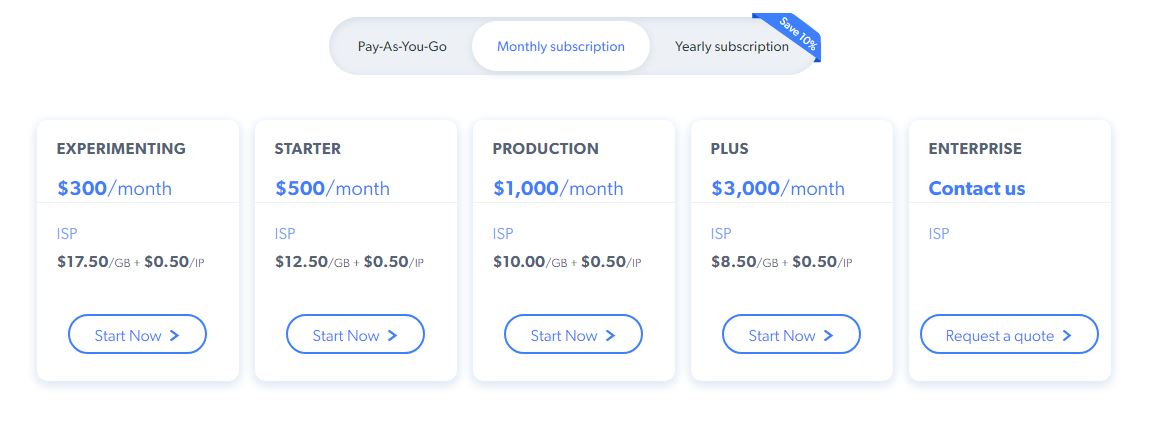
The table below compares all eight providers on the metrics that matter for Footsite copping. Prices reflect entry-level residential and ISP plans. All data sourced from provider knowledge files (May 2026) and Proxyway benchmarks (April 2025).
| Provider | Best Proxy Type for Footsites | Residential Entry Price | ISP Entry Price | Sticky Session | DataDome Compatibility |
|---|---|---|---|---|---|
| Decodo | Residential + Dedicated ISP | $3.75/GB (3 GB plan) | $3.33/IP/mo (3 IPs) | Up to 30 min | Excellent |
| Bright Data | ISP + Residential | $8/GB PAYG ($4/GB w/ PROXYWAY60) | $1.30/IP/mo (shared) | Customizable | Excellent |
| Oxylabs | ISP + Residential | $6/GB ($30/mo, 5 GB) | $1.60/IP/mo (10 IPs) | Static (subscription-long) | Excellent |
| IPRoyal | Sneaker Residential + ISP | $7.35/GB PAYG (non-expiring) | $1.80/proxy/24h | Up to 7 days | Good |
| NetNut | ISP (DiViNetworks backbone) | $3.53/GB ($99/mo, 28 GB) | $14.40/GB ($99/mo, 7 GB) | Indefinite | Excellent |
| Infatica | Residential + ISP | $4/GB PAYG | $1.95–$3.00/IP/mo | Up to 60 min | Good |
| SOAX | Residential | $3.60/GB ($90/mo, 25 GB) | Via unified plan | Up to 60 min (residential) | Good |
| Rayobyte | ISP (US-focused) + Residential | $7.50/GB (1 GB) | $5.00/IP (5 IPs) | As long as available | Good |
Pricing note: Footsites are bandwidth-heavy — Foot Locker added a queue GIF that eats through data while you wait. Budget 20–30% more bandwidth than you think you’ll use per drop. ISP proxies are per-IP (not per-GB), so they’re actually more cost-effective for high-bandwidth sessions. Verify all pricing at the provider’s live site before purchasing, as rates change. Promo codes (PROXYWAY60, proxyway35, PROXYWAY35%, PROXYWAY30, Proxyway, proxyway) are subject to expiry.
Footsite Proxy Pros & Cons: What to Expect
Footsite proxies solve a specific, concrete problem — but they’re not magic. Here’s what you gain, and what you need to accept going in.
Pros ✓
- Run multiple bot tasks simultaneously: One IP allows one task. Proxies let you run 5, 10, or 50 tasks in parallel — your success rate scales directly with the number of tasks you can run cleanly
- Survive the DataDome bot-detection layer: ISP proxies and high-quality residential proxies pass DataDome checks that immediately ban datacenter IPs
- Stay in queue through long waits: Sticky sessions mean your IP doesn’t rotate while you’re waiting — critical now that Footsites use a queue rather than a live checkout race
- Access region-locked drops: US proxies for US-exclusive releases; UK proxies for UK-exclusive Foot Locker drops that never reach other markets
- Avoid cross-account linking: Each account gets its own IP — no geo-mismatch flags and no shared IP fingerprinting that links multiple accounts
Cons ✗
- Not a guarantee: Even the best proxies can’t promise a cop — bot configuration, billing profiles, CAPTCHA setup, and release timing all affect the outcome
- Bandwidth burns fast: The Footsite queue GIF can consume 50–100 MB per task session — multiply that across 10 tasks and your GB allowance disappears quickly
- ISP proxies are expensive at entry: $1.60–$3.33/IP/month sounds cheap but adds up when you need 10+ IPs for a multi-task operation
- IP burnout: Heavily used residential IPs may already be flagged by DataDome before you ever send a request — always buy from providers with dedicated sneaker or ISP pools
- Same billing profile = cancellation: Adyen’s fraud detection links billing info across tasks — you need separate payment details per task, not just separate IPs
Bottom Line: Footsite proxies are essential for anyone running more than one bot task per release. The main risk is choosing the wrong proxy type (datacenter instead of ISP/residential) or a provider without dedicated sneaker pools. Stick to ISP or residential proxies with 30-minute+ sticky sessions, verify the provider has US and UK coverage, and budget for the high bandwidth that Footsite queue sessions consume.
Footsite Proxy Provider Ratings Breakdown
Scores reflect sneaker-copping-specific criteria: DataDome bypass performance, sticky session quality, ISP proxy availability, pricing competitiveness, and ease of setup with sneaker bots. Third-party Proxyway benchmark data used where available.
| Provider | DataDome Bypass | Session Quality | ISP Proxies | Price | Ease of Use | Overall |
|---|---|---|---|---|---|---|
| Decodo | 4.8/5 | 4.7/5 | 4.5/5 | 4.7/5 | 4.8/5 | 4.7/5 |
| Bright Data | 4.9/5 | 4.8/5 | 4.9/5 | 3.2/5 | 3.5/5 | 4.5/5 |
| Oxylabs | 4.9/5 | 4.9/5 | 4.8/5 | 3.5/5 | 4.0/5 | 4.5/5 |
| IPRoyal | 4.2/5 | 4.8/5 | 4.0/5 | 4.4/5 | 4.3/5 | 4.2/5 |
| NetNut | 4.8/5 | 4.9/5 | 4.9/5 | 3.3/5 | 3.5/5 | 4.2/5 |
| Infatica | 4.3/5 | 4.9/5 | 4.0/5 | 4.3/5 | 3.9/5 | 4.2/5 |
| SOAX | 4.2/5 | 4.3/5 | 3.8/5 | 4.2/5 | 4.0/5 | 4.1/5 |
| Rayobyte | 4.1/5 | 4.0/5 | 4.0/5 | 3.8/5 | 4.2/5 | 4.0/5 |
Rating Summary: Decodo leads overall — best combination of DataDome bypass, session quality, ISP options, competitive pricing, and ease of integration with sneaker bots. Bright Data and Oxylabs dominate on raw ISP infrastructure quality but lose ground on price and beginner-friendliness. IPRoyal earns high marks on session duration and PAYG flexibility. NetNut is the ISP specialist but premium pricing and a business-focused UX limit its appeal for casual sneakerheads.
Are Footsite Proxies Legit, Safe & Worth It?
Legitimacy & Safety
- ✓ Proxies are legal to purchase and use: Buying proxy services from commercial providers is legal. You’re purchasing network routing — what you do with that routing determines legality. Using a proxy to cop sneakers for personal resale is entirely legal in most jurisdictions.
- ✓ Sneaker bots are not illegal: Using automated checkout tools isn’t illegal if you’re buying through official stores. Most sneaker sites prohibit bots in their terms of service, so there’s account-level risk (bans), but no legal liability for the buyer.
- ✓ Ethically sourced residential proxies: Providers in this list (Decodo, Bright Data, Oxylabs, Infatica) are EWDCI members or ISO-certified — their residential IPs come from opt-in peer networks, not compromised or hijacked devices.
- ✓ Established providers with track records: Bright Data (2014), Decodo/Smartproxy (2018), Oxylabs (2015), NetNut, and IPRoyal have operated for multiple years with substantial customer bases. Proxyway independently benchmarks their performance — you’re not trusting marketing claims alone.
Long-Term Reliability
The sneaker proxy space shifts constantly. Footsite anti-bot protection evolves, ISP ASN ranges get flagged over time, and proxy providers update their pools in response. The providers in this list have the scale and infrastructure to keep pace — they’re actively refreshing IP pools, adding new ISP partnerships, and monitoring DataDome bypass rates. Smaller specialized sneaker proxy vendors (often sold on Discord or Twitter) typically resell the same infrastructure as the providers in this list, usually at higher prices with less support.
Reality check: Proxies are one component of a successful Footsite cop, not the whole system. You also need: (1) a good sneaker bot with correct Footsite-specific task configuration; (2) separate billing profiles per task (Adyen is strict — same profile on multiple tasks = cancellations); (3) CAPTCHA harvester setup for the queue; (4) enough bandwidth for the queue GIF (plan 50–100 MB per task session). If you have all four right and still miss the drop, it could be pure demand — on hyped releases, even perfect setups fail.
Our Recommendation: Yes, footsite proxies are worth it for anyone running more than one bot task per release. Start with Decodo’s free 100 MB trial — configure your sneaker bot with the proxy credentials, run a test task on a non-release day to confirm the setup works, and then scale up before the next major drop. Don’t buy a large proxy plan without testing compatibility with your specific bot first. Decodo’s 30-minute sticky sessions and ISP options cover the full range of Footsite use cases at the best price point in this list.
Footsite Proxy FAQs: Your Questions Answered
What are footsite proxies?
Footsite proxies are IP addresses specifically chosen or configured to work on the Foot Locker family of stores: Foot Locker, Champs Sports, Eastbay, and Footaction. Because all four sites share the same server infrastructure and DataDome bot-detection system, the same proxy requirements apply across all of them. The best footsite proxies are ISP proxies (static residential IPs from real ISPs) or rotating residential proxies with sticky sessions of at least 10–30 minutes.
Do datacenter proxies work on Footsites?
Rarely. Footsites run DataDome, which identifies and blocks known datacenter IP ranges almost immediately. Datacenter proxies can occasionally be used for CAPTCHA harvesting tasks (where you need cheap IPs to access Google’s CAPTCHA service), but for actual checkout tasks, they’re too easily detected and banned. You need ISP proxies or high-quality residential proxies to survive DataDome’s screening.
What are the best proxies for Footsites overall?
For most users, Decodo is the best all-round footsite proxy provider — it combines the fastest residential proxies globally (Proxyway April 2025), 30-minute sticky sessions, dedicated ISP proxies, and the most competitive pricing (from $3.75/GB residential). For large-scale professional operations needing the best ISP quality, Bright Data or Oxylabs are the enterprise benchmarks. For budget buyers who cop occasionally, IPRoyal’s non-expiring PAYG is the most economical option.
How long should sticky sessions be for Footsite proxies?
At minimum, 10 minutes. The recommended standard is 30 minutes. Footsites use a queue system where you wait in line after the drop fires. If your proxy’s IP rotates while you’re in queue, you lose your place and have to start over. ISP proxies are indefinitely sticky by default. For rotating residential proxies, you need to manually configure session duration — ensure you select 30 minutes in your bot’s proxy settings or in the provider’s dashboard.
Do I need US proxies for Foot Locker?
For US Foot Locker, Champs Sports, and Eastbay, yes — you need US residential or ISP proxies. Foreign IPs trigger geo-flags and increase the likelihood of DataDome challenges. For Foot Locker UK, you need UK proxies. All eight providers in this list offer US and UK coverage. If you’re buying from a non-US location but want to access US-only releases, ensure the provider’s ISP or residential proxies actually include US addresses (not just “global” coverage that may have thin US density).
What is DataDome and why does it block proxy users?
DataDome is a real-time bot-protection service used by Foot Locker and its family of stores. It analyzes incoming traffic for bot-like behavior — request velocity, ASN reputation, IP history, browser fingerprinting, and behavioral patterns. Datacenter IPs are flagged immediately because their ASN ranges (AWS, Cloudflare, etc.) are known hosting providers, not residential networks. ISP proxies from consumer ASNs look exactly like a real home user, which is why they survive DataDome screening.
Do Nike SNKRS proxies work on Footsites too?
Not always. Nike SNKRS uses a different anti-bot system (Nike’s own in-house protection, not DataDome). Some proxies that work on Footsites may also work on SNKRS, but the requirements differ. SNKRS is generally considered harder to bot because Nike invests more heavily in detection. Many sneakerheads maintain separate proxy configurations for Nike SNKRS versus Footsites — test your setup on both before a major drop.
How many proxies do I need for Footsites?
One proxy per task. If you’re running a sneaker bot with 10 tasks, you need 10 unique IPs. Each task must have its own IP, its own billing profile, and its own bot account to avoid cross-linking. Most proxy providers sell residential bandwidth (per GB) rather than per-IP — you pull a new IP for each task session. ISP proxies are per-IP, so 10 tasks = 10 ISP proxies.
Is sneaker copping with bots on Footsites illegal?
No. Using an automated tool to purchase sneakers from official retail stores is not illegal in most countries. Foot Locker’s terms of service prohibit bots, so your account may be banned if detected — but that’s a ToS violation, not a legal one. Using proxies alongside bots is also legal. The ethical concern most often raised is fairness to manual shoppers, not legality.
Why do I keep getting cancellation emails from Foot Locker?
Most likely because Foot Locker’s Adyen payment processor detected the same billing profile across multiple orders. Adyen is extremely strict — if it sees the same card, name, address, or email linked to more than one order on a limited release, it flags them all and triggers cancellations. You need completely separate billing profiles (different card, different name/address) for each task. Proxies alone cannot solve this — you need both unique IPs and unique payment identities.
What is the cheapest footsite proxy option?
IPRoyal offers the most flexible budget entry: non-expiring PAYG residential traffic from $7.35/GB at small volumes, dropping to around $1.75/GB at high volumes. ISP proxies are available per-day ($1.80/proxy/24h) which avoids monthly minimums for occasional buyers. For someone who only cops a few times per year, IPRoyal’s non-expiring model prevents wasted spend on traffic that expires between drops.
Which footsite proxy provider has the best free trial?
Decodo offers the best free trial — 3 days and 100 MB at no cost. That’s enough to run test tasks with your sneaker bot and confirm compatibility before committing. Infatica’s 7-day trial for $4 gives more time and data if you want to test across multiple drop simulations. Rayobyte offers 50 MB free on residential. NetNut offers a 7-day company trial. IPRoyal doesn’t have a free trial but has a 24-hour return window on some products.
Final Verdict
Footsite copping in 2026 demands ISP or residential proxies with long sticky sessions — DataDome has made everything else nearly useless. The eight providers in this list all offer viable Footsite proxy options, but they differ sharply on ISP proxy quality, sticky session duration, DataDome bypass performance, and pricing. Decodo leads on the combination of all four: fastest residential speeds globally, 30-minute sticky sessions, dedicated ISP proxies, and the best value in the market. Bright Data and Oxylabs are the right choice for serious resellers who need the deepest ISP infrastructure at any cost. IPRoyal and Infatica serve buyers who prioritize session duration or budget flexibility over raw performance.
✓ Top Picks by Use Case
- Decodo — Best overall: 30-min sessions, ISP proxies, fastest residential speeds, free trial
- Bright Data — Best for large ops: 400M+ IPs, 1.3M+ ISP proxies, PROXYWAY60 for 60% off
- Oxylabs — Best enterprise: static ISP IPs held for full subscription, dedicated account manager, proxyway35 for 35% off
- IPRoyal — Best budget: non-expiring PAYG, per-day ISP rental, sneaker-specific pools
- Infatica — Best session length: up to 60-min sticky, fastest UK residential, $4 trial
- NetNut — Best ISP quality: DiViNetworks backbone, 1M+ always-online IPs
✗ When to Look Elsewhere
- You’re only running one task — your home IP works fine for that
- You’re using datacenter-only proxies — they’ll get banned immediately on DataDome
- You expect proxies alone to guarantee a cop — bot config and billing profiles matter equally
- You need Nike SNKRS proxies specifically — different anti-bot system, test separately
Ready to Cop Your Next Drop?
Start with Decodo’s free 100 MB trial — configure your sneaker bot, test on a non-release day, and scale up before the next major Footsite drop.
Try Decodo Free — Best Footsite Proxy Value →