
11 Best YouTube Proxies for Scraping and Automation in 2026
The best YouTube proxies of 2026, ranked by IP pool quality, geo-unblocking, scraping success rates, and per-GB pricing for YouTube automation.
⚡ Quick Verdict
YouTube blocks scrapers fast and geo-restricts content hard. Most generic proxies fail within minutes on YouTube’s aggressive anti-bot detection. The providers below have been evaluated specifically for YouTube automation, geo-restriction bypass, multi-channel account management, and data scraping. Bright Data leads for enterprise-grade YouTube scraping, Decodo wins for value and speed, and IPRoyal is the most accessible budget pick with non-expiring traffic. Your best choice depends on whether you need rotating residential IPs for scraping, stable ISP IPs for channel management, or raw datacenter speed for rank tracking.
YouTube unblocking, scraping & account management
From $1.75/GB at volume; PAYG entry from $7.35/GB (IPRoyal); $2/GB residential (Decodo)
195+ countries, 99.9%+ success rate on YouTube
You fire up your YouTube automation tool, and within twenty requests, you’re blocked. Or you’re trying to scrape trending video data from a country whose content YouTube restricts outside its borders. Or you run five YouTube channels and YouTube flags all of them because they share an IP address. These are real, daily frustrations for marketers, researchers, and creators — and finding the best YouTube proxies is the only clean fix.
YouTube runs some of the most aggressive anti-bot infrastructure of any platform. It fingerprints user agents, tracks request patterns, monitors session behavior, and geo-tags every connection. A generic proxy list pulled from the internet will get you banned in minutes. You need proxies that look like real users — residential IPs from actual devices — and you need enough of them to rotate cleanly across your requests.
The use cases vary widely: some teams use proxies for YouTube scraping — pulling video rankings, view counts, and trending content by region for research or competitive intelligence. Others rely on a YouTube proxy provider to manage multiple channels without triggering account suspensions. And plenty of users simply want to watch geo-restricted content that YouTube won’t serve outside a specific country.
We’ve tested and compared 11 YouTube proxy servers across all these use cases — evaluating IP pool depth, rotation quality, geo-targeting granularity, success rates on YouTube’s endpoints, and honest pricing. Here’s what actually works.
What Are YouTube Proxies?
A YouTube proxy is a server that routes your traffic through an IP address other than your own before it reaches YouTube’s servers. From YouTube’s perspective, every request looks like it comes from a different user — masking your real IP and, depending on the proxy location, making you appear to be in a different country entirely.
Three proxy types are relevant for YouTube use cases:
- Residential Proxies — IPs assigned by ISPs to real home users. YouTube treats these as ordinary user traffic, making them the hardest to detect and block. Best for scraping YouTube data, bypassing geo-restrictions, and any automation that needs to look human.
- ISP / Static Residential Proxies — Fixed IPs sourced from ISPs. They look residential but stay constant across sessions. Ideal for managing multiple YouTube channels or YouTube accounts where you need the same IP every time.
- Datacenter Proxies — Fast, cheap server IPs. YouTube is particularly aggressive at detecting and blocking datacenter ranges, but they still work for basic geo-unblocking and lower-risk tasks like checking public video metadata. Learn more in our guide to datacenter proxies.
Why YouTube Proxy Quality Matters More Than Elsewhere
YouTube’s anti-bot system is one of the most sophisticated on the internet, backed by Google’s machine learning infrastructure. It monitors not just IP reputation but session behavior, request cadence, browser fingerprints, and header patterns. A proxy that works fine on a basic e-commerce site can fail completely on YouTube within seconds. This is why provider pool quality — not just pool size — is the deciding factor. You need ethically sourced residential IPs with low fraud scores, not recycled datacenter ranges with a residential label slapped on them.
Who Needs YouTube Proxies?
✓ Ideal Users for YouTube Proxies
- YouTube Scrapers & Researchers — Collecting video rankings, trending data, comment volumes, or view counts at scale. Without a rotating residential proxy, YouTube detects and blocks your IP before you’ve made 50 requests.
- Multi-Channel Managers — Running more than one YouTube channel from the same IP gets accounts flagged as connected. Static residential (ISP) proxies let each channel operate from a unique, stable identity.
- Geo-Restriction Bypasses — Accessing YouTube videos licensed only in specific countries (music videos, regional content, country-restricted ads). A proxy from the right country lets you view content as a local.
- YouTube SEO & Rank Trackers — Monitoring keyword rankings and video positions in YouTube search from different geographic markets requires local IPs to see the real localized results.
- Automation Tool Users — Running bots for view counting, subscriber management, or engagement automation requires IPs that won’t get flagged by YouTube’s bot-detection layer. YouTube proxies are also a subset of broader social media proxies used across platforms.
✗ Not Ideal For
YouTube proxies are NOT the right tool if you:
- Want to artificially inflate view counts or manipulate YouTube metrics — this violates YouTube’s Terms of Service regardless of proxies
- Expect datacenter IPs to pass YouTube’s bot detection on protected endpoints — they usually fail
- Are using free proxy lists — they are nearly always already blacklisted by YouTube
- Need high-bandwidth video streaming at scale — residential proxies add latency not suited to 4K streaming
11 Best YouTube Proxies — Tested & Ranked by Use Case
Here are our top picks for the best YouTube proxies, evaluated specifically on YouTube use cases: scraping, geo-restriction bypass, channel management, and automation. Each listing covers pool quality, pricing, and real pros and cons.
1. Decodo (formerly Smartproxy)

Decodo (formerly Smartproxy, rebranded April 2025) is the fastest residential proxy network that Proxyway has ever benchmarked — and it has won Proxyway’s Best Value award five consecutive years. For a full breakdown, see our Decodo proxy review. For YouTube, the speed matters: slow proxies cause YouTube requests to time out or get flagged for unusual latency patterns. Decodo’s residential network delivers a 99.86% success rate at under 0.6 seconds average response time, which is exactly what you need for smooth YouTube scraping without triggering rate limits.
The 115M+ residential IP pool covers 195+ locations. You get unlimited concurrent sessions, sticky sessions up to 30 minutes for maintaining YouTube login state, and rotating sessions for scraping. The 3-day free trial with 100 MB is a clean way to test YouTube performance before committing to a paid plan.
Best for: YouTube scraping, rank tracking, geo-unblocking across multiple countries, value-conscious teams.
Pricing: Residential from $2/GB (at higher tiers). Entry plan: $11.25/mo (3 GB at $3.75/GB). PAYG at $4/GB. 3-day free trial with 100 MB. 14-day money-back guarantee.
Pros ✓
- Fastest residential proxies globally — Proxyway April 2025
- 99.86% success rate on residential (Proxyway tested)
- Unlimited concurrent connections — no throttling on scraping threads
- Best Value award from Proxyway for 5 consecutive years
- Free 3-day / 100 MB trial to test YouTube coverage
- Site Unblocker for bypassing advanced YouTube anti-bot layers
Cons ✗
- No SOCKS5 on residential proxies (HTTP/HTTPS only)
- PAYG and monthly subscription cannot be combined on same account
2. ProxyEmpire

ProxyEmpire’s defining feature for YouTube users is traffic that never expires. See our ProxyEmpire proxies review for the full picture. Most proxy services put a monthly expiry on bandwidth — you pay for 10 GB, use 4, and lose the remaining 6 at month-end. ProxyEmpire’s rollover model means your unused traffic carries forward indefinitely, even if your subscription lapses. For teams doing seasonal YouTube data collection — quarterly competitive research, annual trend analysis — this avoids the waste cycle entirely.
With 30M+ residential IPs across 170+ countries and city, region, and ISP/ASN targeting, ProxyEmpire gives you solid geo-targeting for YouTube content that varies by country. Their HTTP/HTTPS/SOCKS4/SOCKS5 support covers the full protocol range, which matters if you’re integrating with automation tools that require specific protocol handling. The $1.97 trial (100 MB) is a genuine low-risk entry point.
Best for: Sporadic YouTube scraping, seasonal data collection, budget-conscious teams who want non-expiring traffic.
Pricing: Rotating residential from $7/GB (1 GB PAYG). 60 GB plan at $5/GB ($300/mo). With code PROMO50: 50% off residential, mobile, and static residential. $1.97 trial (100 MB).
Pros ✓
- Non-expiring rollover traffic — unique in the market
- PROMO50 cuts prices by 50% on residential and mobile
- Full protocol support: HTTP, HTTPS, SOCKS4, SOCKS5
- City, region, ISP, and ASN targeting for geo-specific YouTube access
- Up to 1,000 concurrent sessions
- 99.97% uptime on residential proxies
Cons ✗
- Smaller active pool than advertised (9.3M active vs 30M claimed, per Proxyway)
- Response times slower than top-tier providers on some gateways
- Less-established brand — smaller user community than enterprise options
3. Oxylabs

Oxylabs earned the Proxyway Best Enterprise Provider award in 2025 and holds the top position in pool size benchmarks with 175M+ residential IPs. Read our Oxylabs proxy review for a deep dive on enterprise features. The 99.90% global residential success rate is the highest tested by Proxyway among all providers — and for YouTube, where success rates can drop significantly on harder endpoints, starting from that baseline matters. Oxylabs’ Web Unblocker and Scraping Browser handle YouTube’s JavaScript-rendered content, meaning you can pull dynamic video data without managing browser sessions yourself.
Coordinate-level geo-targeting is unique to Oxylabs in this list. Beyond country, state, and city — you can target a GPS coordinate for hyper-local YouTube content checks. Combined with support in Russian, English, and Chinese, and a dedicated account manager for enterprise clients, Oxylabs is the serious choice for large-scale YouTube data operations.
Best for: Enterprise YouTube scraping, large-scale data collection, teams needing maximum success rates.
Pricing: Residential from $30/mo (5 GB at $6/GB). Promo code proxyway35 — 35% off first purchase. Datacenter from $12/mo (10 shared IPs). 7-day free trial for company accounts. ISP from $16/mo (10 IPs).
Pros ✓
- 175M+ IPs — #1 pool size in Proxyway benchmarks
- 99.90% residential success rate globally (Proxyway 2025)
- Coordinate-level geo-targeting for precise YouTube location checks
- Web Unblocker and Scraping Browser for JavaScript-heavy YouTube pages
- Dedicated account manager for enterprise clients
- Proxyway Best Enterprise Provider 2025
Cons ✗
- Above-average pricing — $6/GB to start
- No PAYG option — subscription required
- KYC required before accessing services
4. IPRoyal

IPRoyal is the best budget option in this list — and it’s not just budget by price, it’s budget by design. See our IPRoyal proxies review for a full pricing breakdown. The PAYG model with non-expiring traffic means you buy exactly what you need and use it at your own pace. Buy 5 GB for a YouTube scraping job, finish the job, and the unused portion sits in your account without a countdown timer. For part-time researchers, individual creators managing a few channels, or anyone who uses YouTube proxies occasionally rather than continuously, this model makes far more sense than a $100/mo subscription plan.
IPRoyal’s 32M+ residential pool covers 195+ countries with city and state targeting. Sticky sessions of up to 7 days are longer than most competitors — useful for YouTube account management tasks where you need to maintain a consistent IP identity across multiple sessions. Their ISP proxies can also be rented for just 24 hours at $1.80/proxy, which is genuinely unique: most providers require 30-day ISP commitments.
Best for: Occasional YouTube proxy users, individual channel managers, small teams on tight budgets.
Pricing: Residential PAYG from $7.35/GB (1 GB). Subscription from $7/GB. Volume pricing drops to ~$1.75/GB at high volumes. ISP proxies from $1.80/proxy/24 hours. Code PROXYWAY30 — 30% off.
Pros ✓
- Non-expiring PAYG traffic — buy once, use whenever
- No monthly minimum commitment
- 7-day sticky sessions — longest in this list
- ISP proxies available for just 24 hours (no 30-day lock-in)
- 99.56% residential success rate globally (Proxyway 2025)
- Accepts 25+ cryptocurrencies
Cons ✗
- 32M IP pool is smaller than enterprise providers
- Some advanced targeting features require higher spend to unlock
- Entry per-GB rate ($7.35) is higher than competitors at low volumes
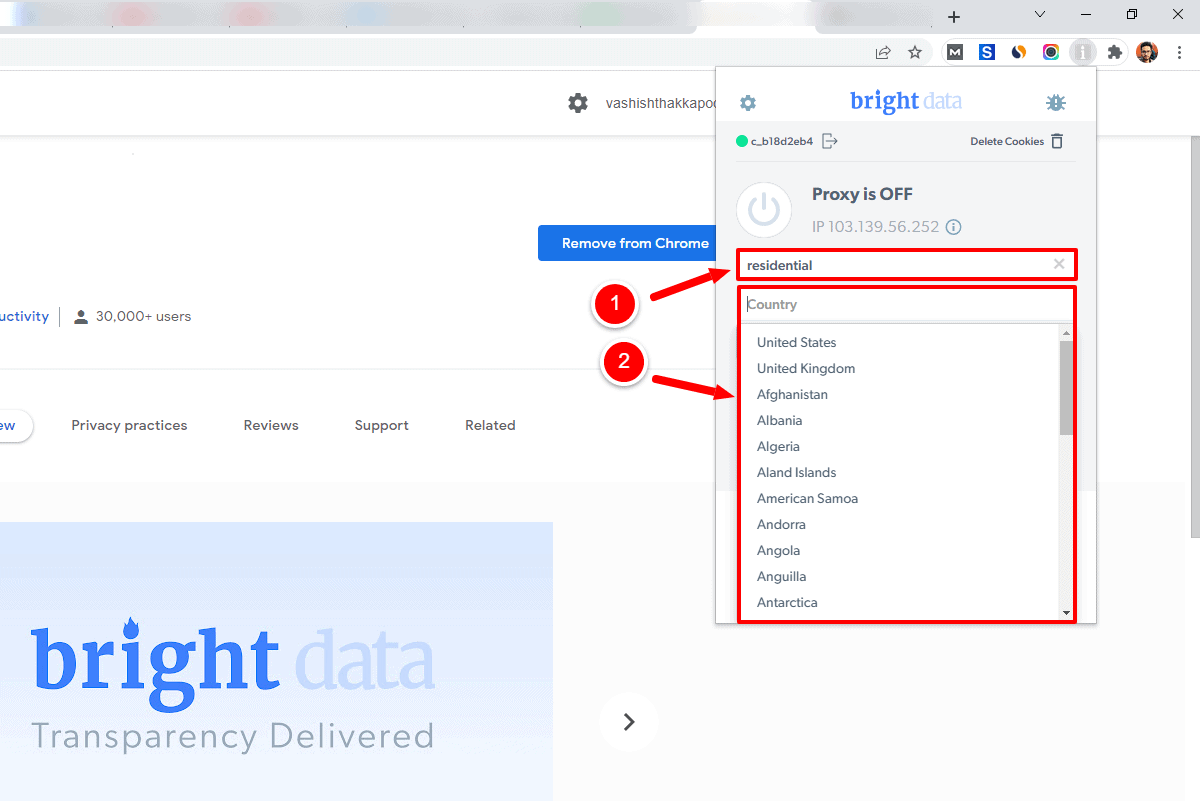
5. Bright Data

Bright Data operates the largest proxy network in the industry. Our Bright Data review covers its full product suite. With 72M+ residential IPs and 2M+ mobile IPs across 195 countries, the depth of its pool is unmatched for YouTube use cases requiring serious scale. Its Web Unlocker API and Scraping Browser handle YouTube’s bot detection automatically — you point them at a YouTube URL and get clean HTML back, without writing detection-bypass logic yourself. For teams that need to scrape YouTube video data at thousands of requests per minute without managing proxy rotation manually, this is the benchmark provider.
The platform includes a dedicated YouTube Scraper API, real-time analytics on proxy usage, and city, ZIP, and ASN targeting all at no additional cost. The 98.96% global success rate (Proxyway tested) holds up well on Google properties including YouTube, though you’ll want to use the dedicated YouTube scraping tools rather than raw proxies for heavy scraping.
Best for: Enterprise YouTube scraping, high-volume data collection, Fortune 500 companies.
Pricing: Residential PAYG at $8/GB. Subscription plans from $499/mo. ISP proxies from $1.30/IP. Datacenter from $0.60/GB PAYG. 7-day free trial for companies. Code PROXYWAY60 — 60% off for new users.
Pros ✓
- 72M+ residential IPs and 2M+ mobile IPs — deepest pool in the market
- Dedicated YouTube Scraper API — no manual proxy rotation needed
- Web Unlocker and Scraping Browser for JavaScript-heavy YouTube pages
- City, ZIP, and ASN targeting at no extra cost
- ISO 27001 certified; strict ethical sourcing (KYC required)
- Proxyway Best Platform for Proxies 2024
Cons ✗
- Most expensive in this list — subscriptions start at $499/mo
- KYC approval can take up to 3 business days
- Can be complex to set up for first-time proxy users
6. Storm Proxies

Storm Proxies entered the proxy market in 2016 and built a niche around affordable rotating residential proxies with straightforward per-port pricing. For YouTube users in the US and EU — where most YouTube automation happens — their rotating residential proxies start at $19/port with no per-GB caps, which is a fundamentally different pricing model from the rest of this list. If you’re doing high-volume YouTube scraping where GB costs would add up fast, a flat per-port model removes that variable entirely.
Their 700,000+ IP pool is smaller than enterprise providers, but they compensate with a 48-hour trial and straightforward setup. They support both dedicated and rotating residential proxies, though they only cover USA and EU locations — a real limitation if you need to access YouTube content geo-restricted to Asia, Latin America, or other regions.
Best for: High-volume US/EU YouTube scraping on a fixed budget, per-port pricing use cases.
Pricing: Rotating residential from $19/port. No per-GB charges — flat per-port pricing. 48-hour money-back guarantee.
Pros ✓
- Unlimited bandwidth — no per-GB charges, fixed monthly cost
- Fast response speeds — optimized residential network
- Affordable $19/port entry for rotating residential
- 48-hour money-back guarantee
- Easy-to-use dashboard and setup
- Both dedicated and rotating proxy options available
Cons ✗
- Limited to USA and EU only — no Asia, LATAM, or other regions
- IP whitelisting only — no username/password authentication
- Smaller IP pool (700K) vs enterprise providers
7. ProxySeller

ProxySeller is one of the strongest options for YouTube channel management specifically. When you’re running a YouTube automation proxy setup across multiple channels, you need stable, private IPs — not rotating residential IPs that change on every request. ProxySeller’s private datacenter and ISP proxies give each channel a dedicated IP identity, with two-factor authentication on all servers and both SOCKS5 and HTTPS protocol support. The 220+ location coverage is among the widest in this list for private proxies.
With 10+ years in the proxy business, a Trustpilot rating around 4.7/5, and dedicated channels at up to 1 Gbps per proxy, ProxySeller punches above its weight class. The pricing is genuinely competitive at $7/GB residential, and they offer IPv4, IPv6, mobile, ISP, and residential proxy types — so you can mix and match based on what each YouTube task requires.
Best for: Multi-channel YouTube managers, private proxy users, teams needing SOCKS5 with stable IPs.
Pricing: Residential from $7/GB. ISP from $1/IP. Mobile from $10/IP. IPv4 datacenter available. No free trial, but highly affordable vs competitors.
Pros ✓
- 220+ locations — extensive geographic coverage for private proxies
- Two-factor authentication on all servers
- SOCKS5 and HTTPS protocol support
- Dedicated channels at up to 1 Gbps — fast and private
- 10+ years in the business — established reputation
- 24/7 customer support, GDPR and ISO compliant
Cons ✗
- No free trial for residential proxies
- JS-rendered pricing pages — harder to verify exact tier breakdowns
8. Rayobyte

Rayobyte (formerly Blazing SEO) is one of the few proxy providers that openly publishes its ethical sourcing standards and details exactly how its residential pool is built. With 300,000+ IPs globally and a $1/GB residential entry price, it’s one of the most affordable residential options in this list. The residential proxies cover Datacenter, Residential, ISP, and Mobile types — enough flexibility to handle different YouTube tasks with a single provider.
The 50 MB free trial lets you test proxy quality before spending anything. For YouTube users who need clean, ethically sourced IPs with customizable pricing plans and unique C-class subnets to avoid IP clustering, Rayobyte is a solid mid-market pick. The limited payment method options and smaller pool vs enterprise providers are the main trade-offs.
Best for: Budget-conscious YouTube scrapers, developers valuing ethical sourcing, ISP proxy users.
Pricing: Residential from $1/GB. Datacenter and ISP also available. 50 MB free trial to test before purchasing.
Pros ✓
- $1/GB residential — one of the lowest per-GB prices in this list
- 50 MB free trial to test YouTube proxy quality
- Ethically sourced proxies with transparent practices
- Unique C-class subnets to avoid IP clustering
- Full proxy type stack: datacenter, residential, ISP, mobile
- Flexible, customizable pricing plans
Cons ✗
- Limited payment methods compared to other providers
- Smaller global IP pool than enterprise options
9. Nimble
Nimble (nimbleway.com) offers a clean no-code approach to YouTube data collection. Their dashboard lets you build, modify, and run proxy pipelines without writing code — which is a genuine advantage for marketing teams and researchers who want YouTube scraping capabilities without a developer on staff. The 99.9% uptime guarantee and 0.25-second response time are strong numbers, and the geotargeting options for city, state, and country let you pull location-specific YouTube data accurately.
The residential proxy network is priced at $8/GB and works well for YouTube data scraping. Datacenter proxies handle geo-unblocking at lower cost. The main limitation is geographic coverage at the top tier — currently 12 countries — which covers major markets but misses a lot of the world. The free trial of 100 credits per week gives you a realistic zero-cost entry point to test performance.
Best for: Non-technical teams, YouTube data scraping without code, clean pipeline management.
Pricing: Residential at $8/GB. Free trial: 100 credits/week at $0. Monthly/yearly subscriptions only.
Pros ✓
- No-code dashboard — build YouTube scraping pipelines without writing code
- 0.25 s response time — fast for residential proxies
- 99.9% uptime guarantee
- City, state, and country targeting for geo-specific YouTube data
- Free weekly trial (100 credits) with no credit card required
- Dedicated + rotating IP options in one platform
Cons ✗
- Only 12 countries covered — limited global reach
- No account wallet or PAYG top-up option
- Monthly and yearly subscriptions only — no one-off purchases
10. BuyPersonalProxy

BuyPersonalProxy is a straightforward, beginner-friendly proxy service that covers YouTube geo-unblocking and basic scraping tasks without a steep learning curve. Their 120M+ IP pool across 200+ countries is one of the larger claimed pools in this list, and the 24-hour free trial lets you test performance risk-free before committing to a plan. The $5.99/GB pricing for residential proxies sits in the mid-range — not the cheapest, but reasonable for a service with broad geographic coverage.
They support Datacenter, Residential, ISP, and Mobile proxy types — enough to cover YouTube channel management (ISP), video scraping (residential), and content unblocking (datacenter). The platform is designed to be easy to use, making it a good fit if you’re new to proxies and want something that works out of the box for YouTube without complex configuration.
Best for: YouTube proxy beginners, users wanting broad geographic coverage, casual geo-restriction bypass.
Pricing: Residential at $5.99/GB. 24-hour free trial. Multiple proxy types available.
Pros ✓
- 120M+ claimed IP pool across 200+ countries
- 24-hour free trial — risk-free testing
- Beginner-friendly platform and setup process
- Ethically sourced proxies with customizable plans
- Full proxy type coverage: datacenter, residential, ISP, mobile
Cons ✗
- Limited payment methods
- Less established brand with smaller user community
11. HighProxies
HighProxies categorizes its proxies by intended use — and yes, they offer a specific “YouTube proxy” category alongside Instagram, Ticketmaster, and general private proxies. This use-case-specific approach means the IPs they deliver for YouTube have been pre-vetted for that platform, reducing the setup friction that comes with general-purpose proxy services. Starting at $10.90/mo, they’re one of the most affordable dedicated private proxy options in this comparison.
They cover 26 server locations with HTTPS and HTTP proxies, support up to 100 concurrent sessions, and offer instant proxy delivery after purchase. The 3-day money-back guarantee is a low-risk entry point. The main limitation is the small pool (1,000+ IPs) and lack of SOCKS5 support — which means this is a solid pick for basic YouTube private proxies, but not for heavy-duty scraping or automation that requires the full protocol stack.
Best for: Simple YouTube private proxy use, users wanting pre-configured YouTube-specific proxies, entry-level channel management.
Pricing: From $10.90/mo for dedicated YouTube proxies. 3-day money-back guarantee. Instant delivery.
Pros ✓
- YouTube-specific proxy category — pre-configured for the platform
- Fast delivery — proxies active immediately after purchase
- Affordable entry at $10.90/mo
- 3-day money-back guarantee
- Up to 100 concurrent sessions
- Fast and responsive customer support
Cons ✗
- Very small IP pool (1,000+ IPs) — limited for large-scale scraping
- No SOCKS5 protocol support
- Only 11+ countries — limited geographic coverage
YouTube Proxy Selection Guide: 5 Key Factors
Not all YouTube use cases need the same proxy type. Here are the five factors that actually determine which provider will work for your specific situation.
Proxy Type: Residential vs ISP vs Datacenter
For scraping YouTube data or bypassing geo-restrictions where detection matters, residential proxies are the only reliable choice. YouTube’s bot detection looks at IP reputation, and residential IPs from real devices have the cleanest reputation. ISP (static residential) proxies are best for account management — you need the same IP across multiple sessions, and ISP IPs stay stable while still appearing residential. Datacenter proxies only make sense for low-risk tasks like checking public metadata on less protected YouTube endpoints.
Pool Size and Rotation Quality
A pool of 1,000 IPs rotated across thousands of requests will start repeating IPs quickly — and YouTube tracks repeat IPs very aggressively. Providers with millions of residential IPs (Bright Data at 72M+, Decodo at 115M+, Oxylabs at 175M+) give you enough pool depth that the same IP rarely appears twice in a session. For heavy YouTube scraping, plan for at least 10M+ IPs available in the pool.
Geo-Targeting Granularity
YouTube content varies significantly by country, and sometimes by city. A music video licensed only in Japan requires a Japanese IP. An ad campaign that runs differently in Berlin vs. Munich requires city targeting. Check that your chosen provider offers the geographic level you actually need — country-only targeting won’t cut it for regional YouTube research.
Session Control: Rotating vs Sticky
Rotating proxies change IP on every request — ideal for scraping where you want maximum IP diversity. Sticky sessions keep the same IP for a defined period (5 minutes, 30 minutes, up to 7 days) — necessary for YouTube account management where changing IP mid-session triggers account flags. IPRoyal’s 7-day sticky sessions are the longest in this list; Decodo and Bright Data both offer up to 30 minutes.
Budget: Per-GB vs Unlimited vs Per-IP
For low-volume use, PAYG (per-GB) pricing from IPRoyal or ProxyEmpire avoids subscription waste. For high-volume scraping, Storm Proxies’ unlimited bandwidth model caps your costs. For account management, per-IP pricing from ProxySeller or HighProxies is most predictable. Match your pricing model to your actual usage pattern — don’t pay for a 100 GB/mo subscription if you use 3 GB/mo.
YouTube Proxy Pricing: Side-by-Side Comparison
Pricing for YouTube proxies varies widely depending on proxy type, volume, and billing model. Here’s how the 11 providers compare side-by-side at entry level and at scale.
| Provider | Best For YouTube | Starting Price | Billing Model | Trial | Countries |
|---|---|---|---|---|---|
| Decodo | Scraping, geo-unblocking | $3.75/GB (3 GB plan) | Per-GB subscription or PAYG | 3-day / 100 MB free | 195+ |
| Bright Data | Enterprise scraping | $8/GB PAYG residential | PAYG or subscription ($499+/mo) | 7-day (companies) | 195 |
| Oxylabs | Large-scale scraping | $6/GB (5 GB plan) | Subscription only | 7-day (companies) | 195 |
| IPRoyal | Budget, sporadic use | $7.35/GB PAYG (non-expiring) | PAYG or subscription | None | 195+ |
| ProxyEmpire | Rollover traffic | $7/GB PAYG | Subscription (rollover) | $1.97 / 100 MB | 170+ |
| ProxySeller | Channel management | $7/GB residential | Per-IP or per-GB | None | 220+ |
| Storm Proxies | High-volume US/EU | $19/port rotating | Per-port (flat) | 48-hour guarantee | USA & EU |
| Nimble | No-code scraping | $8/GB residential | Monthly/yearly subscription | 100 credits/week free | 12 |
| Rayobyte | Budget residential | $1/GB residential | Customizable | 50 MB free | Global |
| BuyPersonalProxy | General YouTube use | $5.99/GB residential | Per-GB or per-IP | 24 hours free | 200+ |
| HighProxies | Private YouTube proxies | $10.90/mo per proxy | Per-proxy monthly | 3-day money-back | 11+ |
Watch out for these pricing traps:
- Entry per-GB prices often require high-volume commitment — check what you actually pay at your expected monthly usage
- Unused GB on most plans expire at month-end — only IPRoyal (PAYG) and ProxyEmpire offer non-expiring traffic
- Storm Proxies’ per-port pricing ($19/port) only covers USA and EU — you’ll need a different provider for other regions
- Promo codes change frequently — verify current codes at each provider’s site before purchasing
YouTube Proxy Pros & Cons
Pros ✓
- Bypass YouTube geo-restrictions — access region-locked content from anywhere
- Scrape YouTube data at scale without IP bans disrupting your pipeline
- Manage multiple YouTube channels from separate IP identities
- Monitor YouTube SERP rankings from specific countries or cities
- Test how your YouTube ads and content appear in different markets
- PAYG options (IPRoyal, ProxyEmpire) mean no wasted monthly spend
Cons ✗
- Good YouTube proxies are not cheap — enterprise-grade residential IPs start at $2–8/GB
- YouTube’s detection improves constantly — what works today may need adjustment in 3–6 months
- Datacenter proxies often fail on YouTube’s harder endpoints
- Monthly expiry on most plans creates pressure to use quota
- KYC at Bright Data and Oxylabs adds setup friction
Bottom Line: For YouTube scraping and automation, residential proxies for YouTube are essentially mandatory. The cost is higher than datacenter proxies, but the success rate difference on YouTube’s endpoints is dramatic. Budget $3–6/GB for a mid-market residential proxy for general YouTube use. Enterprise operations should budget $6–8/GB and use providers with dedicated YouTube scraping APIs.
Best YouTube Proxy Providers: Head-to-Head Comparisons
Here’s how the top providers stack up against each other on the dimensions that matter most for YouTube use cases.
| Factor | Bright Data | Decodo | Oxylabs |
|---|---|---|---|
| IP Pool Size | 72M+ residential | 115M+ residential | 175M+ residential |
| Success Rate (Proxyway) | 98.96% global | 99.86% global | 99.90% global |
| Avg. Response Time | 1.12 s | 0.63 s | 0.65 s |
| YouTube Scraping API | Yes (dedicated) | Via Site Unblocker | Via Web Unblocker |
| Entry Price | $8/GB PAYG | $3.75/GB (3 GB plan) | $6/GB (5 GB plan) |
| Free Trial | 7-day (companies) | 3-day / 100 MB | 7-day (companies) |
| Proxyway Rating | 9.3/10 | 9.3/10 | 9.3/10 |
Winner for enterprise YouTube scraping: Bright Data (dedicated YouTube API) | Winner for value: Decodo (fastest + best price) | Winner for pool size: Oxylabs (175M+ IPs, 99.90% success rate)
| Factor | IPRoyal | ProxyEmpire | Storm Proxies |
|---|---|---|---|
| IP Pool | 32M+ residential | 30M+ residential | 700,000+ residential |
| Billing Model | PAYG non-expiring | Rollover subscription | Per-port, no GB cap |
| Entry Price | $7.35/GB PAYG | $7/GB PAYG | $19/port (rotating) |
| Geo Coverage | 195+ countries | 170+ countries | USA & EU only |
| Sticky Sessions | Up to 7 days | Up to 24 hours | Rotating only |
| SOCKS5 | Limited | Yes (full) | No |
| Traffic Rollover | Never expires (PAYG) | Rolls over indefinitely | Unlimited, no expiry concern |
Winner for budget/occasional use: IPRoyal (non-expiring PAYG) | Winner for seasonal scraping: ProxyEmpire (infinite rollover) | Winner for high-volume US/EU: Storm Proxies ($19/port, no GB cap)
🏆 Choose Residential YouTube Proxies When
- Scraping YouTube video data, comments, or ranking data
- Bypassing YouTube’s advanced anti-bot detection
- Accessing geo-restricted YouTube content accurately
- Running YouTube automation tools that mimic user behavior
- Testing how YouTube content appears to users in specific regions
🔍 Choose ISP/Static Proxies Instead When
- Managing multiple YouTube channels needing stable IP identities
- Running long YouTube sessions where changing IP causes flags
- Creating and warming up new YouTube accounts
- Operating YouTube automation that needs consistent session state
- Doing low-volume, high-frequency YouTube tasks from a fixed location
YouTube Proxy Provider Ratings
How we scored the providers in this roundup, based on YouTube-specific evaluation criteria.
| Category | Score | Notes |
|---|---|---|
| IP Pool Quality & Size | 4.7/5 | Bright Data, Decodo, and Oxylabs all exceed 70M+ residential IPs with verified purity above 95% |
| YouTube Success Rate | 4.5/5 | Oxylabs 99.90% and Decodo 99.86% lead; datacenter providers score lower on YouTube endpoints |
| Geo-Targeting Depth | 4.3/5 | Most enterprise providers offer city/ASN targeting; Nimble and HighProxies limited to country-level |
| Pricing & Value | 4.2/5 | Wide range from $1/GB (Rayobyte) to $8/GB (Bright Data); PAYG options from IPRoyal add flexibility |
| Ease of Use & Setup | 4.4/5 | Decodo and IPRoyal are simplest to start; Bright Data has steeper learning curve and KYC delay |
| Reliability & Uptime | 4.6/5 | Enterprise providers all claim 99.9%+ uptime; ProxyEmpire and Decodo independently verified by Proxyway |
| Overall Rating | 4.5/5 | The best YouTube proxies in 2026 are significantly better than 3 years ago — enterprise-grade tools are now accessible to mid-market teams |
The market for YouTube proxy servers has matured considerably. Decodo and Oxylabs now offer independent benchmark verification (Proxyway April 2025), making it easier to validate performance claims before buying. Budget options have improved too — IPRoyal’s PAYG non-expiring model and Rayobyte’s $1/GB pricing make quality residential proxies for YouTube accessible for small teams. The main remaining gap is geographic coverage at the budget end: sub-$5/GB providers often have limited city targeting or narrow country coverage.
Are YouTube Proxies Safe & Worth It?
Legitimacy & Safety
- ✓ All 11 providers in this list are legitimate, commercial proxy services — not free proxy lists or dark web scrapers
- ✓ Bright Data and Oxylabs are ISO 27001 certified with independently verified ethical sourcing
- ✓ ProxyEmpire holds EWDCI certification (Ethical Web Data Collection Initiative)
- ✓ Paid residential proxies route your traffic through real devices that have opted in to share bandwidth — not compromised machines
- ✓ HTTPS/SOCKS5 protocol support means your traffic is encrypted in transit
- ✓ Reputable providers do not log your browsing activity beyond connection metadata
Long-Term Reliability
YouTube updates its anti-bot infrastructure regularly, and the proxy market adapts in response. Providers with large residential pools (Bright Data, Decodo, Oxylabs) tend to stay ahead of YouTube’s detection because the sheer diversity of their IP space makes pattern-matching harder. Smaller providers with static or limited pools may periodically have batches of IPs flagged and need to be refreshed. For long-term YouTube proxy use, stick to providers with proven track records of adapting to platform changes.
Reality check: YouTube proxies do not make you invisible or protect against violations of YouTube’s Terms of Service. If you use proxies to artificially inflate metrics, spam comments, or create fake accounts, YouTube’s enforcement goes beyond IP blocking — it includes account termination, legal action, and DMCA considerations. Legitimate use cases (scraping public data, geo-restriction bypass, market research, multi-channel management with genuine content) are what quality proxy services are designed to support.
Worth It? Final Verdict
YES, YouTube Proxies Are Worth It If:
- You scrape YouTube data regularly and IP bans disrupt your workflow
- You manage multiple YouTube channels and need isolated IP identities
- You need to access geo-restricted YouTube content for market research or content licensing checks
- You run YouTube rank tracking across multiple countries
- Your automation tool budget includes proxy costs as a necessary line item
NO, Skip YouTube Proxies If:
- You only watch YouTube occasionally and a VPN would cover your geo-restriction needs
- You expect a $10/mo shared proxy to reliably beat YouTube’s bot detection — it won’t
- You’re hoping to use proxies for metric manipulation — this violates YouTube ToS regardless
- Your scraping volume is low enough that a single residential IP works without bans
Our recommendation: Start with Decodo’s 3-day free trial (100 MB) to test YouTube performance before spending anything. If you need non-expiring PAYG traffic for occasional use, IPRoyal’s model is the most flexible. For serious enterprise YouTube scraping, Bright Data’s dedicated YouTube scraper API is worth the premium pricing.
YouTube Proxy FAQs
What are the best YouTube proxies in 2026?
The best YouTube proxies in 2026 are Decodo (best value, 99.86% success rate), Bright Data (best for enterprise scraping with a dedicated YouTube API), and Oxylabs (largest pool at 175M+ IPs, 99.90% success rate). For budget use, IPRoyal offers non-expiring PAYG traffic from $7.35/GB. The right choice depends on your use case: scraping, geo-unblocking, or channel management.
What type of proxy works best for YouTube?
Residential proxies work best for YouTube scraping and geo-restriction bypass. YouTube’s bot detection system identifies and blocks datacenter IP ranges aggressively — residential IPs from real user devices are much harder for YouTube to detect. For account management (running multiple YouTube channels), static residential (ISP) proxies are better because they give you a stable, consistent IP identity without rotation.
Are YouTube proxies legal?
Using proxies to access YouTube is not illegal in most jurisdictions — proxies are legitimate tools used widely in business, research, and security contexts. However, using proxies to violate YouTube’s Terms of Service (artificial metric inflation, spam, fake accounts) can result in account termination and in some cases legal action under YouTube’s terms. The proxy itself is neutral; the legality depends on what you do with it.
Should I use a free YouTube proxy?
No. Free proxy lists are publicly available and are already heavily blacklisted by YouTube. YouTube detects and blocks known free proxy IP ranges within minutes. Beyond the performance failure, free proxies often log your traffic and may expose your data. For any serious YouTube use case, paid residential proxies are the only reliable option.
How do YouTube proxies help with geo-restrictions?
YouTube licenses content differently by country. When you route your connection through a proxy in the country where the content is licensed, YouTube serves it as if you’re a local user. For example, connecting through a UK residential proxy lets you see YouTube content available only in the UK. This works reliably with residential proxies; datacenter proxies are often blocked on premium licensed content.
Can I manage multiple YouTube channels with proxies?
Yes. The key is using static residential (ISP) proxies, not rotating residential proxies. Each YouTube channel needs a consistent, unique IP address across sessions. Rotating proxies change IP on every request, which triggers YouTube’s account-linking detection. Static ISP proxies give each channel its own stable identity. ProxySeller and IPRoyal (via ISP proxies) are good options for this use case.
How many proxies do I need for YouTube scraping?
For light scraping (a few hundred requests per day), a small rotating residential pool works. For medium-scale YouTube scraping (thousands of requests per day), you need a provider with at least 10M+ residential IPs to avoid repeat IP patterns. For enterprise-scale scraping (millions of requests), Bright Data’s dedicated YouTube scraper API or Oxylabs’ 175M+ pool are the right starting points.
Which YouTube proxy provider has the best free trial?
Decodo offers the best free trial: 3 days with 100 MB of residential proxy bandwidth, no credit card required. Nimble offers 100 credits per week at no cost (also no credit card). Rayobyte gives 50 MB free. Bright Data and Oxylabs offer 7-day trials for company accounts. BuyPersonalProxy has a 24-hour trial.
Do I need SOCKS5 for YouTube proxies?
Most YouTube scraping and geo-unblocking tasks work fine with HTTP/HTTPS proxies. SOCKS5 becomes important if you’re running automation tools that specifically require it, or if you need UDP support (for real-time protocols). ProxyEmpire offers full SOCKS4/SOCKS5 support. Decodo’s residential proxies are HTTP/HTTPS only — which is sufficient for the majority of YouTube use cases.
How do I set up a YouTube proxy?
Setup depends on your use case:
- Browser-based access: Configure your browser’s proxy settings or use a browser extension. Enter the proxy hostname, port, and credentials from your provider dashboard.
- Scraping tools: Most scrapers (Scrapy, Puppeteer, Playwright) have built-in proxy rotation support. Provide the proxy endpoint and authentication details in your tool’s configuration.
- YouTube automation tools: Most YouTube automation software has a “proxy” field in settings. Paste the proxy address and credentials, then assign a unique proxy to each account.
- No-code option: Nimble’s dashboard lets you set up YouTube pipelines without any code.
What’s the difference between rotating and sticky YouTube proxies?
Rotating proxies assign a new IP address to each request (or after a set interval). This is what you want for scraping, where maximum IP diversity prevents YouTube from detecting repeated patterns. Sticky proxies keep the same IP for a defined period — from 5 minutes up to 7 days (IPRoyal’s maximum). Sticky sessions are essential for YouTube account management, where changing IP mid-session can trigger account flags or require re-authentication.
Can YouTube proxies help with YouTube SEO rank tracking?
Yes. YouTube serves different search results in different countries and sometimes different cities. If you want to track how a video ranks in Japan vs. the US vs. Germany, you need a proxy from each target country to see the accurate local results. Providers like Decodo, Bright Data, and Oxylabs offer country and city-level targeting that covers all major YouTube markets. Make sure you use a fresh rotating IP for each rank check to avoid YouTube caching your previous result.
Final Verdict
The best YouTube proxies in 2026 fall into distinct tiers based on what you actually need. For serious YouTube scraping at scale, Bright Data and Oxylabs deliver the pool depth, success rates, and dedicated YouTube tooling to handle millions of requests without interruption. For the best balance of performance and price, Decodo is the clear winner — independently benchmarked as the fastest residential proxy globally, with a 100 MB free trial that requires no credit card. For budget-conscious or occasional users, IPRoyal’s non-expiring PAYG traffic is the most flexible model available. And for YouTube channel managers who need stable private IPs, ProxySeller delivers the dedicated, authenticated proxy identities the task requires.
✓ What We Love About YouTube Proxies in 2026
- Independent third-party benchmarks (Proxyway) now make it possible to verify success rate claims before buying
- Non-expiring PAYG options (IPRoyal, ProxyEmpire) remove the wasteful monthly subscription model for occasional users
- Dedicated YouTube scraping APIs from Bright Data and Oxylabs handle bot detection automatically
- Prices have dropped significantly — $2/GB residential is now achievable at mid-volume with Decodo
- Free trials from Decodo, Nimble, and Rayobyte let you validate YouTube performance before spending
✗ What Could Be Better
- YouTube’s anti-bot detection continues to improve — providers need constant pool refreshes to stay ahead
- KYC requirements at Bright Data and Oxylabs add 1–3 day delays before you can start
- Budget providers (HighProxies, Storm Proxies) have narrow geographic coverage that limits use cases
- Pricing transparency varies — some providers use JS-rendered sliders that make exact pricing hard to verify
Ready to Get the Best YouTube Proxy?
Start with Decodo’s free trial — 100 MB of residential proxy bandwidth, no credit card needed, to test YouTube scraping and geo-unblocking performance before you spend a dollar.
Try Decodo Free — Best YouTube Proxy Value in 2026 →